Fireflies.ai Review: Pricing, Features, and Who It’s Actually For
Quick Verdict
- Rating: 4.4 / 5
- Best for: Sales and customer-facing remote teams that live in a CRM and want meetings automatically logged as deal notes
- Pricing starts at: $10/seat/month billed annually (free plan: yes, unlimited transcription with capped storage)
- Try it: Fireflies.ai official site →
If your team’s meeting notes live in three different Slack threads, a shared doc nobody updates, and someone’s memory, Fireflies.ai is built to fix exactly that. It’s one of the most widely used AI meeting assistants for remote and hybrid teams, and it leans hard into one specific strength: getting what happened on a call into the tools you already run your business from — your CRM, your task tracker, your Slack channels — without anyone typing it up by hand.
What Is Fireflies.ai?
Fireflies.ai is an AI meeting assistant that joins your video calls (Zoom, Google Meet, Microsoft Teams, and others), records and transcribes them, and turns the transcript into a searchable, shareable summary with action items. It’s used by over a million companies, and it’s particularly popular with sales and customer success teams because of how deeply it integrates with CRMs like Salesforce and HubSpot — pushing call notes, next steps, and deal context straight into the systems reps already work in, instead of leaving that context stranded in a transcript nobody reopens.
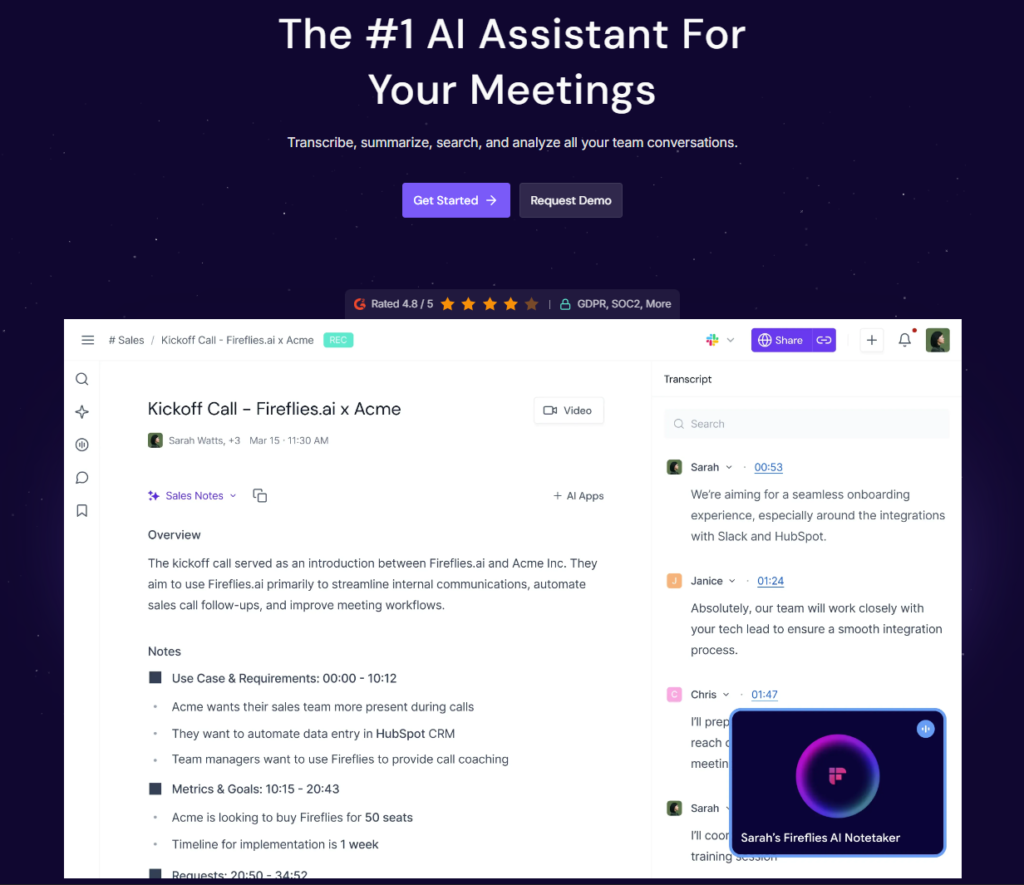
Key Features
- AskFred AI assistant: Ask plain-language questions across one meeting or your whole meeting history (“What objections did the client raise?”) and get answers pulled from the transcript with timestamps, instead of manually re-scanning notes.
- 100+ language transcription: The widest language coverage of the major AI notetakers, which matters if your remote team or client base spans multiple regions.
- Deep CRM and app integrations: 100+ integrations, including Salesforce, HubSpot, Slack, Asana, Jira, and Notion — Fireflies can auto-log call summaries and create follow-up tasks without a human touching the transcript.
- AI Skills / automations: Post-meeting automations that push action items to Slack, update CRM fields, create tasks, and draft follow-up emails directly from the call content.
- Conversation intelligence: On Business and Enterprise plans, team-level analytics on talk time, sentiment, and trends across meetings — useful for coaching sales or support teams remotely.
Pricing
Fireflies uses per-seat pricing with four tiers. All plans include unlimited core transcription and AI summaries; the differences come down to storage, video recording, integrations, and admin/security controls. Note that AI credits (which power features like AskFred and richer AI summaries) are a separate, limited pool on every paid tier — heavy users report needing to buy add-on credit packs, so budget for that if your team relies on AI Q&A daily.
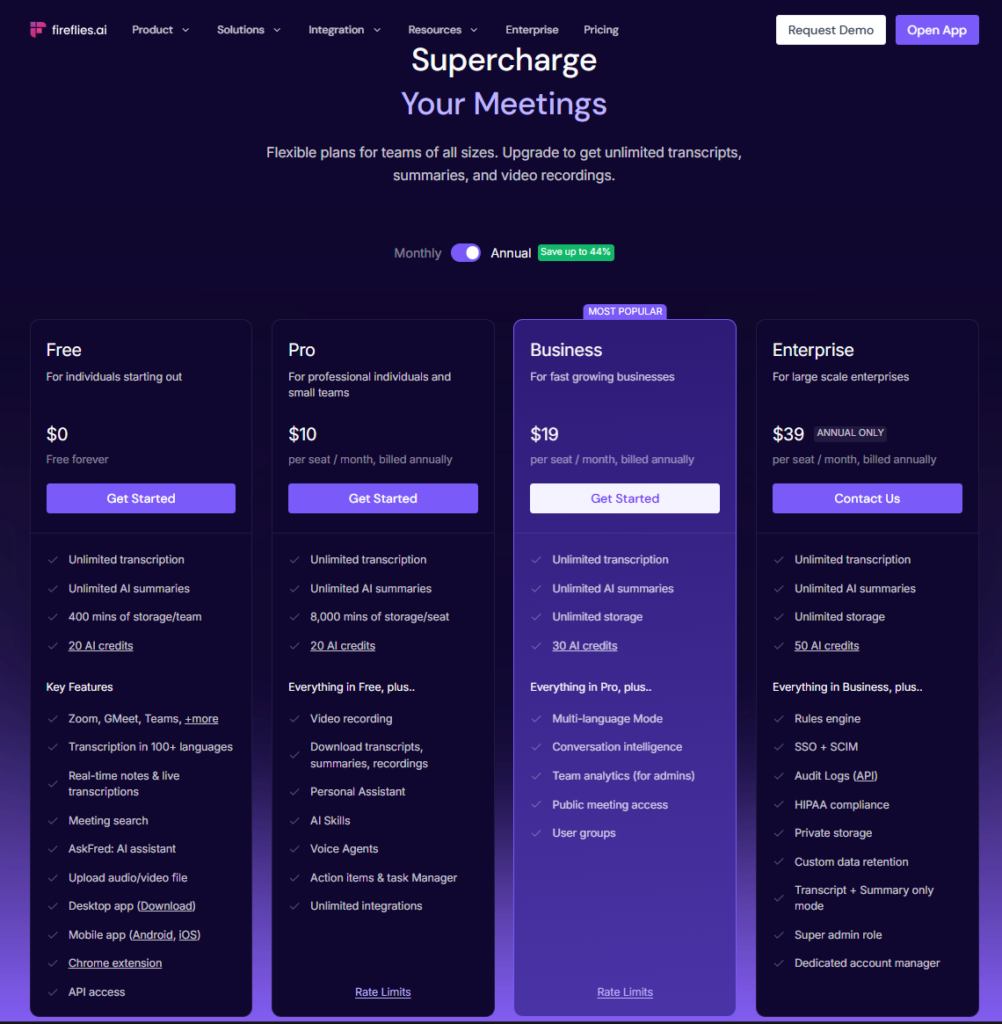
| Plan | Price | Best For |
|---|---|---|
| Free | $0 | Solo users trying out AI transcription with light meeting volume |
| Pro | $10/seat/mo billed annually ($18/mo billed monthly) | Individuals and small teams that want unlimited storage headroom and downloadable transcripts |
| Business | $19/seat/mo billed annually ($29/mo billed monthly) | Growing teams that want CRM sync, team analytics, and unlimited storage |
| Enterprise | $39/seat/mo billed annually (annual only) | Large orgs needing SSO/SCIM, audit logs, HIPAA compliance, and a dedicated account manager |
Pros and Cons
✅ Pros
- Best-in-class CRM and app integrations (100+), ideal for wiring meetings into a revenue stack
- Widest language support of the major tools (100+ languages), strong for distributed/multilingual teams
- Solid, well-reviewed transcription accuracy (independent tests put it in the low-to-mid 90s% on clean audio) plus genuinely useful AI summaries and action items
❌ Cons
- AI credits are a separate limited pool on every paid plan — heavy AskFred/AI-summary users often need to buy add-on packs
- The Fireflies bot visibly joins every call by default, which some clients ask about or find intrusive on sensitive calls
- Reviewers flag billing/cancellation friction as a recurring complaint, and there’s an active class-action alleging voiceprint-consent issues under Illinois’ BIPA (an allegation, not a finding — but worth knowing before a large rollout)
Who It’s For
Fireflies is the strongest pick for sales, customer success, and other client-facing remote teams that already run on a CRM and want meeting notes, next steps, and deal context to land there automatically. It’s also a solid choice for distributed teams working across languages, thanks to its 100+ language transcription. If your main need is simple, fast, real-time notes for internal standups rather than CRM automation, a lighter tool may serve you better — see alternatives below.

Alternatives to Consider
- Otter.ai — Better if you want live, real-time transcription during the call itself and a simpler, English-first note-taking experience; weaker on CRM depth and language coverage.
- Fathom — The strongest free plan of the three (unlimited recordings, no minute caps) and the fastest AI summaries; lighter on integrations and built more for solo users and small teams than deep CRM workflows.
Final Verdict
Fireflies.ai earns its 4.4/5 by doing one thing better than almost anyone else: turning meetings into structured data inside the tools your team already uses. For sales and client-facing remote teams that want CRM-automated meeting notes and don’t mind a visible notetaker bot, Pro annual is genuinely good value. If your priority is a generous free tier or live in-call transcription instead, weigh Fathom or Otter.ai before committing.
Disclosure: This review is based on publicly available product information, pricing pages, and independent third-party testing as of August 2026, not hands-on use by The Deskless Daily team.




Pingback: Notion AI Review: Features, Pricing, and Real-World Use Cases