Quick Verdict
- Rating: 4.0 / 5
- Best for: Busy solo professionals and small teams juggling overlapping deadlines who want AI to actively rebuild their calendar around priorities — not people who just want a lightweight to-do list or a simple booking page
- Pricing starts at: No free plan. Individual Pro AI is $29/month billed annually ($49 billed monthly); team plans start at $19/seat/month billed annually
- Try it: Motion official site →
Reclaim.ai defends the calendar you already have. Motion takes a different bet: it wants to rebuild your entire day, every day, around whatever is actually due. Instead of protecting fixed blocks, Motion treats your to-do list as the input and your calendar as the output — recalculating the whole schedule the moment a priority shifts. We tested the pitch against the price tag to see whether that aggressiveness is worth paying for.
What Is Motion?
Motion (officially Nexusbird Inc.) was founded in 2019 by Harry Qi and Omid Rooholfada, two former quant traders who went through Y Combinator’s Winter 2020 batch. It started as an AI calendar and task app and has since raised $75 million across a Series A through C, including a $38 million round in 2025 that pushed its valuation to $550 million as it began pivoting toward “AI Employees” — automated agents layered on top of the same scheduling engine. For most remote workers the product that matters is still the original core: an AI Task Planner that takes your tasks, deadlines, and priorities and auto-schedules them directly into open slots on your calendar, then re-shuffles everything automatically the instant something changes. Projects, docs, meeting booking, and a daily AI Agenda view sit around that core.
Key Features
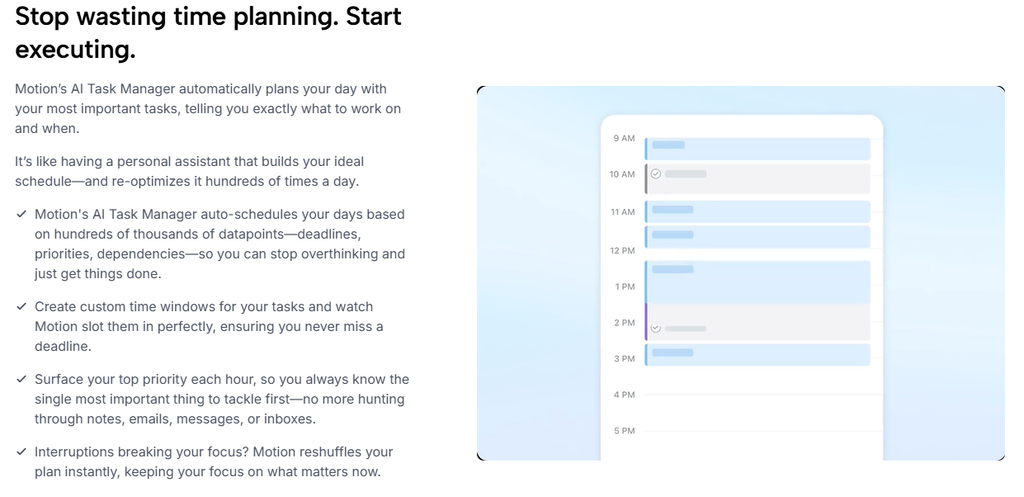
- Auto-Scheduling: Motion’s core mechanic. It scans your availability, task duration, deadlines, and priority, then places each task directly on your calendar — and re-runs the whole calculation the moment a new meeting lands or a task changes.
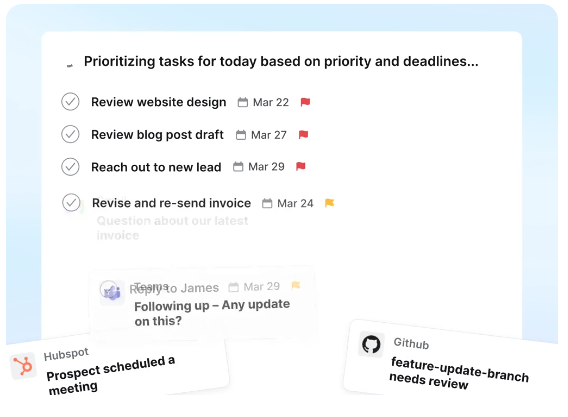
- AI Agenda: A single daily view that merges tasks and meetings into one list, with a badge that flags anything past deadline so you know what needs attention without hopping between projects.
- Projects and Task Dependencies: Lets tasks depend on one another (task B can’t start until task A finishes), which Motion then factors into the auto-scheduling math — deeper project-planning logic than a pure calendar-defense tool like Reclaim offers.
- Booking Pages: A Calendly-style external scheduling link that already accounts for your auto-scheduled tasks and buffer time, so an external booker can’t land in a slot Motion already committed to a deadline.
- Calendar Sync: Full read/write sync with Google Calendar and Microsoft Outlook (Office 365/Exchange Online), plus lighter iCloud support; tasks scheduled in Motion show up in the external calendar for visibility but stay editable only inside Motion.
Pricing
| Plan | Individual | Team (per seat) | Best For |
|---|---|---|---|
| Pro AI | $29/mo billed annually ($49 billed monthly) | $19/seat/mo billed annually ($29 billed monthly) | Solo professionals and small teams who need the core AI scheduler, projects/tasks, and calendar/meetings |
| Business AI | $39/mo billed annually ($69 billed monthly) | $29/seat/mo billed annually ($49 billed monthly) | Teams needing capacity planning, Gantt/timeline views, time tracking, and central billing |
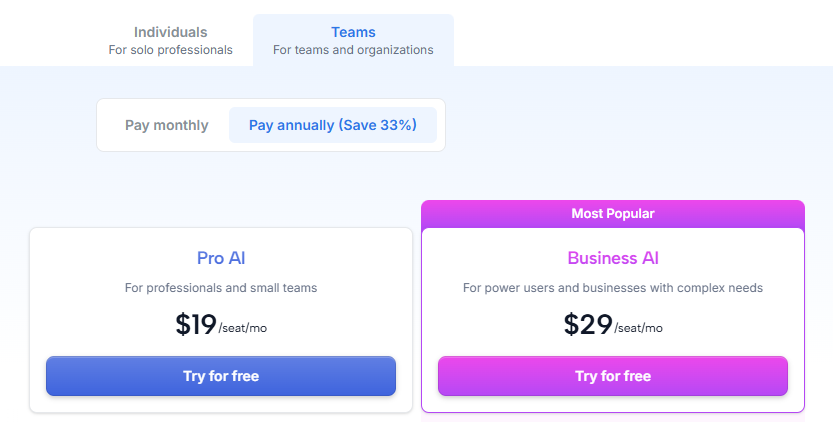
There is no free plan — only a 7-day free trial that requires a credit card up front. Both plans meter usage through monthly AI credits (7,500/seat on Pro AI, 15,000/seat on Business AI), with overage billed at roughly 19–25 cents per 100 credits depending on plan and billing cycle; heavy users who lean on Motion’s AI writer or chat features alongside scheduling can burn through the allotment faster than the headline price suggests. One pricing quirk worth flagging: Motion’s own pricing page opens on the Teams tab by default, so the first number most visitors see ($19/seat) is not what a single user actually pays — switching to the Individuals tab shows the real solo rate of $29–39/month.

Pros and Cons
✅ Pros
- Auto-scheduling genuinely re-plans your whole day in real time, not just a single protected block, which is a meaningful relief after a surprise meeting lands mid-day
- Task dependencies give it real project-planning depth that a pure calendar-defense tool doesn’t attempt
- Full read/write sync across Google Calendar and Outlook, so it fits into either ecosystem without forcing a switch
❌ Cons
- No free plan, and the real individual price ($29–39/month) is easy to underestimate from the pricing page’s default team-tab view
- Steep learning curve — reviewers consistently report 10–15+ minutes just to configure basics like a booking page, well above what a simpler tool like Calendly needs
- Reporting and dashboard depth still lag dedicated project-management tools like ClickUp or Asana, so it’s not a full replacement for either
Who It’s For

Motion is the right fit for busy solo professionals and small teams whose real problem is too many competing deadlines rather than a lack of calendar defense — freelancers juggling client work, founders context-switching across projects, or small teams that want task dependencies factored directly into scheduling. It’s a weaker fit if your calendar is already fairly light and you mainly want to protect a few recurring habits or 1:1s (Reclaim does that more cheaply), if you need serious reporting and dashboards (ClickUp or Asana go deeper), or if you just want a booking link and nothing else (Calendly is simpler and cheaper).
Alternatives to Consider
- Reclaim.ai — a gentler, cheaper AI calendar that defends recurring Habits, 1:1s, and focus time around your existing calendar rather than aggressively rebuilding your whole day; has a genuinely free plan. We reviewed it in detail in a previous post.
- Calendly — a simpler, cheaper booking-link tool for teams that just need external scheduling without task auto-scheduling at all.
- Clockwise — was a direct competitor with a similar focus-time-defense pitch, but shut down in March 2026 after its founding team was acquihired by Salesforce; Clockwise directed its customers to migrate to Reclaim with price matching, so it’s no longer a live alternative.
Final Verdict
Motion earns its price tag if the thing eating your day is competing deadlines and task dependencies, not just a lack of calendar protection — the auto-scheduling engine really does re-plan your day in real time, and the task-dependency logic gives it more genuine project-planning muscle than a defense-only tool. But at $29–39/month for a single user with no free tier, and a setup curve steeper than most productivity apps, it’s overkill for anyone whose calendar problem is smaller than “too many moving deadlines.” For that lighter case, start with Reclaim.ai’s free plan first and only upgrade to Motion if you outgrow it. We compare all three head-to-head, including exact seat pricing, in an upcoming post.
Disclosure: This review is based on Motion’s publicly available pricing and feature documentation as of September 2026, not a paid partnership.
FAQ
- Does Motion have a free plan? No. Motion only offers a 7-day free trial that requires a credit card; there is no permanently free tier the way Reclaim.ai has one.
- How much does Motion actually cost for one person? The pricing page defaults to team pricing ($19/seat/month), but a single user pays the Individuals-tab rate: $29/month for Pro AI billed annually ($49 billed monthly), or $39/month for Business AI billed annually ($69 billed monthly).
- Is Motion or Reclaim.ai better? Motion is more aggressive and task-first, rebuilding your whole day around deadlines and dependencies; Reclaim is gentler and cheaper, defending recurring Habits and 1:1s around a calendar you mostly leave alone. We compare both directly against Calendly in an upcoming post.