Quick Verdict
- Rating: 4.2 / 5
- Best for: Small agencies and remote teams that want one tool for tasks, docs, time tracking, and client work instead of stitching together five apps
- Pricing starts at: $0/month (Free Forever plan available; paid plans start at $7/user/month billed annually)
- Try it: ClickUp official site →
Most small agencies don’t have a project management problem — they have a project management sprawl problem. Tasks live in one app, client feedback lives in email, time tracking lives in a spreadsheet, and someone’s always asking “wait, is this done?” in Slack. ClickUp’s pitch is that it replaces all of that with a single, highly customizable workspace. The question for a lean, remote team is whether that flexibility is worth the learning curve, or whether it just becomes one more tool to configure and maintain.
What Is ClickUp?
ClickUp is an all-in-one work management platform that bundles task management, docs, whiteboards, native time tracking, goals, and an AI layer (ClickUp Brain) into one workspace. It markets itself as “one app to replace them all,” aiming squarely at the gap between simple to-do apps and heavyweight enterprise suites — which puts it right in the wheelhouse of small agencies and distributed teams juggling multiple clients and projects at once.
Key Features
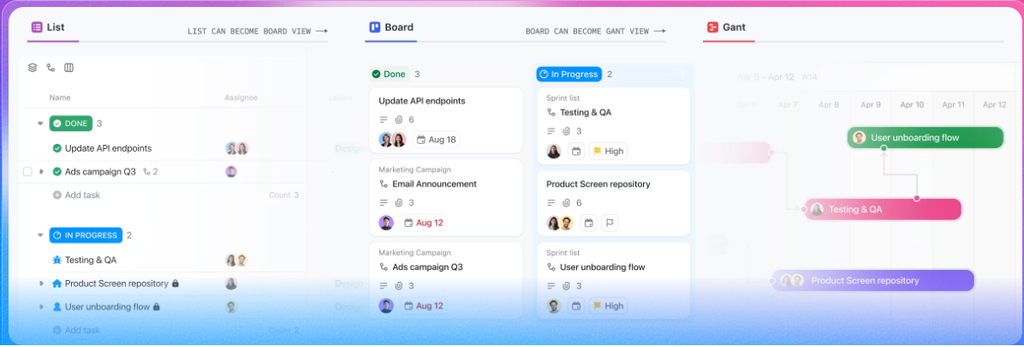
- Highly customizable views: List, Board, Calendar, Gantt, Timeline, and Table views on the same task data — useful when an agency needs a Kanban board for the design team and a Gantt chart for the client status call, without duplicating data.
- Custom Fields and Statuses: Every Space, Folder, or List can have its own workflow stages and custom fields (client name, budget, retainer hours), which matters for agencies running several client accounts with different processes.
- Native time tracking: Built-in timers on tasks, with reporting by assignee or project — a real cost-saver for agencies that would otherwise pay separately for Harvest or Toggl.
- ClickUp Docs and Whiteboards: Lightweight wiki-style docs and visual boards live inside the same workspace as the tasks they reference, so SOPs and client briefs don’t have to live in a separate Notion or Google Docs account.
- ClickUp Brain (AI): An AI layer that can summarize task threads, draft updates, and answer questions using context from your tasks and docs. It’s a paid add-on ($9/user/month for Brain AI, $28/user/month for the “Everything AI” tier) on top of any plan, not a free perk.

Pricing
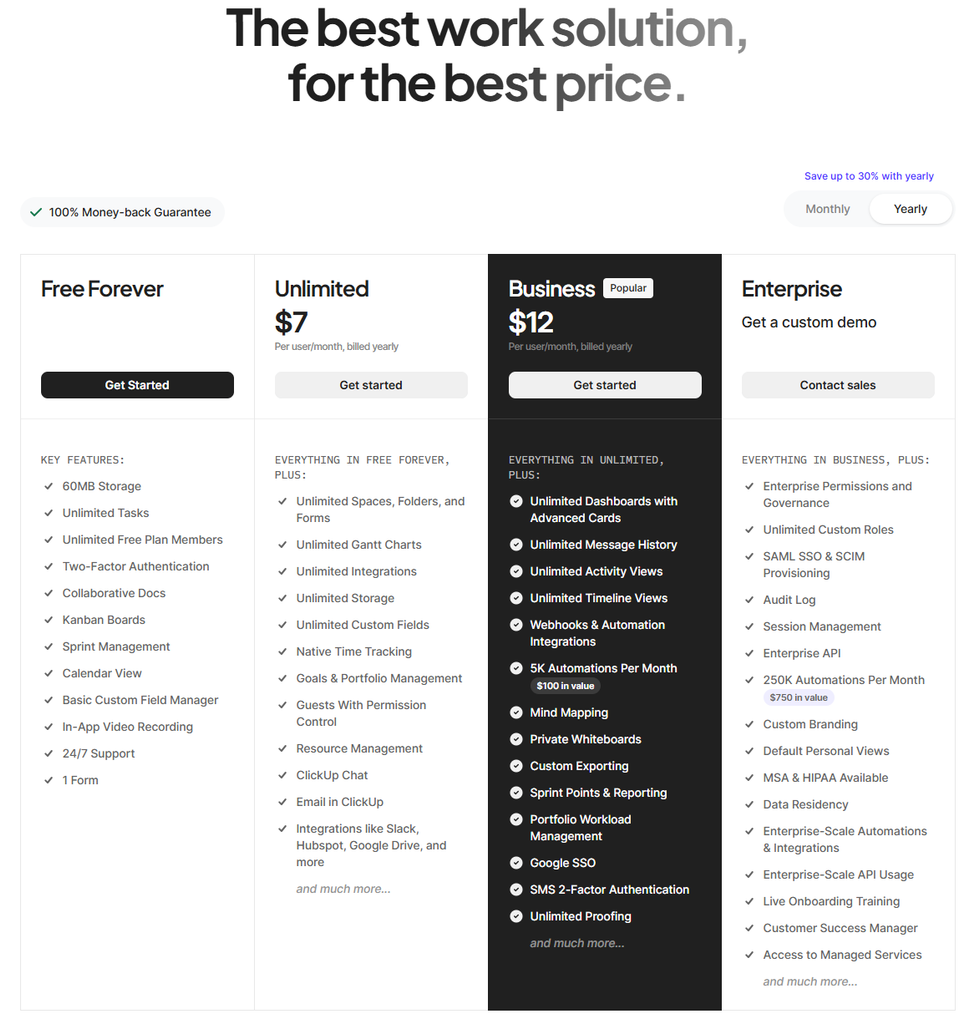
ClickUp’s core plans, confirmed directly from clickup.com/pricing:
| Plan | Price | Best For |
|---|---|---|
| Free Forever | $0 | Solo operators or a very small team testing the platform (60MB storage cap, 100 automation actions/month) |
| Unlimited | $7/user/mo billed annually ($10/mo billed monthly) | Small agencies past the free plan’s storage/automation limits |
| Business | $12/user/mo billed annually ($19/mo billed monthly) | Growing agencies that need more guest seats for clients/freelancers, advanced automations, and reporting |
| Enterprise | Custom quote | Larger orgs needing SSO, HIPAA/advanced security, and dedicated support |
Two things worth flagging for a small agency budgeting this out: ClickUp Brain (the AI layer) is a separate add-on starting at $9/user/month, not included in any base plan. And the Free Forever plan’s 60MB storage cap is genuinely tight — a couple of client presentation decks will eat through it fast, so most agencies end up on Unlimited within the first month or two.
Pros and Cons
✅ Pros
- One workspace for tasks, docs, time tracking, and reporting — fewer subscriptions to manage across a small team
- Extremely customizable per client/project without needing separate tools
- Native time tracking that’s genuinely usable, not bolted-on
- Generous guest-seat allowance on paid plans for client collaboration
❌ Cons
- Steep learning curve — the flexibility that makes it powerful also makes initial setup slow
- AI features cost extra on top of any plan, which adds up fast per seat
- Free plan’s 60MB storage limit is unworkable for most agencies past a trial run
Who It’s For
ClickUp is the strongest fit for small agencies (3-25 people) juggling multiple clients who want to consolidate task management, time tracking, and internal docs into one subscription instead of three or four. It’s a weaker fit for solo freelancers who just need a simple task list — the setup overhead isn’t worth it until you have a team and clients to coordinate across.
Alternatives to Consider
- Asana — Cleaner, simpler interface with a shorter learning curve, but less customizable for agencies running very different workflows per client. We reviewed it, including AI Studio pricing, here.
- Monday.com — Similarly flexible and visual, often preferred by teams that want a more polished, less cluttered UI, at a comparable price point.
- Notion — Better for docs-first teams that want a wiki with lightweight task tracking bolted on, rather than a dedicated project management system.
Final Verdict
ClickUp earns its 4.2/5: it genuinely can replace several separate subscriptions for a small agency, and the native time tracking and per-client customization are real differentiators. The tradeoffs are a real onboarding time investment and AI costs that aren’t included in the sticker price. If your agency has the patience to set it up properly in the first couple of weeks, it pays off; if you need something your team can pick up in an afternoon, weigh it against Asana or Monday.com first.
Disclosure: This review is based on ClickUp’s publicly available pricing and feature documentation as of September 2026, not a paid partnership.
FAQ
- Is ClickUp really free? Yes — the Free Forever plan has no time limit, but it caps storage at 60MB and automations at 100 actions/month, which most agencies outgrow quickly.
- Does ClickUp include AI for free? No. ClickUp Brain is a paid add-on starting at $9/user/month on top of any base plan.
- How does ClickUp compare to Asana and Monday.com for a small agency? ClickUp offers more customization per project/client at a similar or lower price point, but takes longer to set up well. We compare all three directly in an upcoming post.




Pingback: Asana Review 2026: Pricing, AI Features, and Who Should Skip It