Quick Verdict
- Rating: 4.0 / 5
- Best for: Remote teams of 5+ that need cross-project visibility, goals tracking, and structured workflows — not solo operators or two-person shops
- Pricing starts at: $0/month (Free plan capped at 2 users; paid plans start at $10.99/user/month billed annually, $13.49 billed monthly)
- Try it: Asana official site →
Asana is one of the oldest names in project management software, and it still shows up on almost every “best PM tool” shortlist. But the product has changed a lot since it launched — the free plan now caps out at two users, AI features are metered per-seat rather than unlimited, and the feature set has grown dense enough that smaller teams sometimes bounce off it. For a remote team deciding where to put its project tracking, the real question isn’t “is Asana good” (it is) — it’s whether your team is the shape Asana is built for.
Does Asana Have a Free Plan for Personal Use?
Yes. Asana’s Free plan is free forever and works fine for individual/personal use or a very small team — it’s capped at 2 users, with core tasks, lists, boards, and calendar views included, but no workflow automation (“Rules”), no Portfolios, and no Asana AI. If you need more than 2 people, or want automations, reporting, and AI features, paid plans start at $10.99/user/month billed annually ($13.49 billed monthly).
What Is Asana?
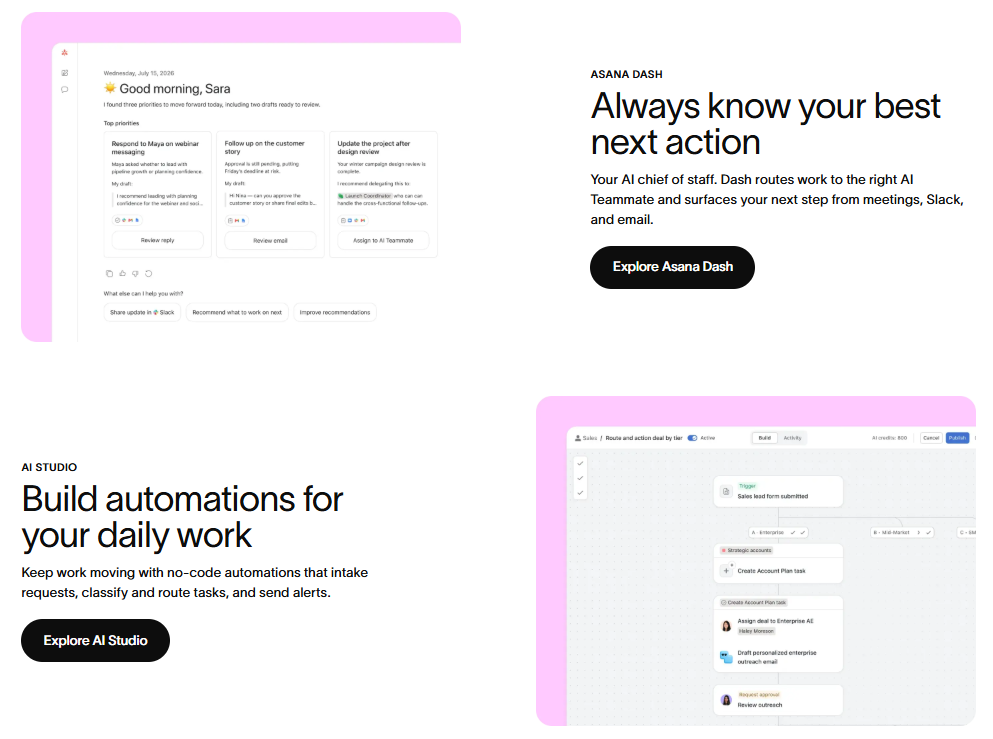
Asana is a cloud-based work management platform for tracking tasks, projects, and goals across a team. It’s built around a strong distinction between individual to-dos and structured team workflows — list, board, timeline, and calendar views sit on top of the same underlying tasks, and Goals/Portfolios let leadership roll individual project status up into a company-wide view. Asana AI (Teammates, Dash, and AI Studio) layers automation and Q&A on top of that structure, but as we’ll cover below, it’s rationed by request count rather than included without limits.
Key Features
- Multiple views on one dataset: Switch between list, board (kanban), timeline/Gantt, and calendar views of the same tasks without re-entering data, so different roles can work the way they think.
- Goals tied to work: Company and team Goals connect directly to the projects and tasks that support them, so leadership can see progress toward strategy, not just task completion counts.
- Workflow automation (“Rules”): Starter and up include unlimited automations for routing approvals, assigning follow-up tasks, and updating statuses without manual busywork.
- Portfolios and resource management: Advanced-tier features that give managers a bird’s-eye view of who’s overloaded across every active project, useful once you’re running more than a handful of projects at once.
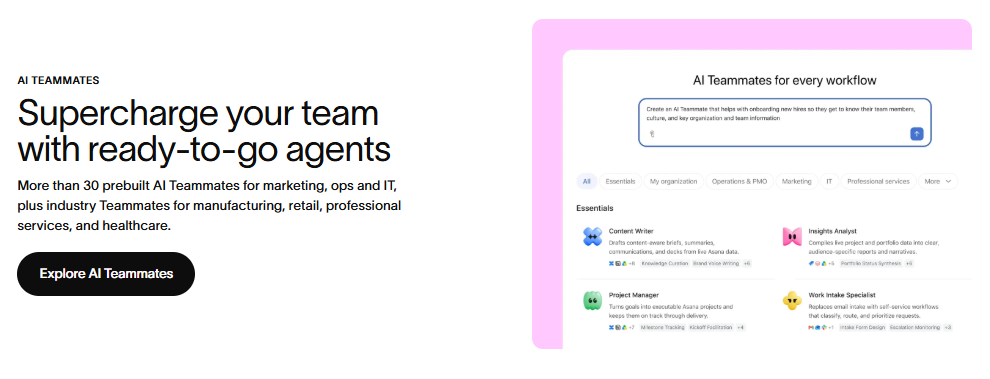
- Asana AI (Teammates, Dash, AI Studio): AI-assisted status summaries, task triage, and a Q&A assistant over your workspace data — but metered to 5 requests per user per month (up to 50-250 per account depending on plan) rather than unlimited.
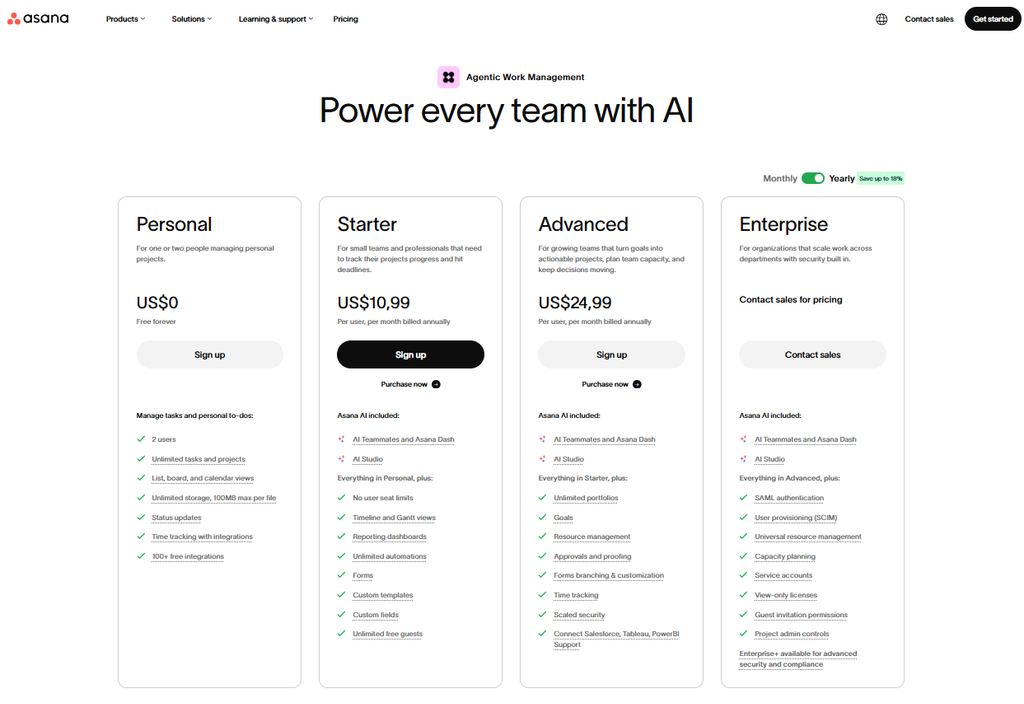
Pricing
| Plan | Price | Best For |
|---|---|---|
| Personal | $0 (free forever, capped at 2 users) | Individuals tracking personal to-dos |
| Starter | $10.99/user/mo billed annually ($13.49 billed monthly) | Small teams that need timelines, forms, and unlimited automations |
| Advanced | $24.99/user/mo billed annually ($30.49 billed monthly) | Growing teams that need Goals, Portfolios, and resource management |
| Enterprise | Custom (contact sales) | Organizations needing SSO, SCIM provisioning, and service accounts |
One catch worth flagging before you commit: Asana AI isn’t a flat “included” feature on any plan — every paid tier caps you at 5 AI requests per user per month, with an account-wide ceiling of 50 (Starter/Advanced) or 250 (Enterprise) requests. If your team plans to lean on AI Teammates or Dash daily, budget for that limit hitting fast on a team of any size.
Asana AI Studio Pricing
Asana AI Studio doesn’t have a separate price tag — you can’t buy it standalone. It’s bundled into every paid Asana plan, but how much of it you actually get depends on which tier your team is on:
| Plan | Monthly price | AI Studio requests included |
|---|---|---|
| Personal (Free) | $0 | No AI Studio access |
| Starter | $10.99/user/mo billed annually ($13.49 billed monthly) | 5 requests/user/month, up to 50 total per account |
| Advanced | $24.99/user/mo billed annually ($30.49 billed monthly) | 5 requests/user/month, up to 250 total per account |
| Enterprise | Custom (contact sales) | Custom AI Studio quota, set during onboarding |
The per-user cap (5 requests/month) is the same on Starter and Advanced — the difference between tiers is the account-wide ceiling, which is what actually bites a busy team first. If five people are all running AI Teammates or Dash queries regularly, a Starter account can burn through its 50-request pool well before the month is over; Advanced’s 250-request pool gives more headroom, but it’s still a shared, metered resource rather than something unlimited you get by paying more per seat. There’s no separate “AI Studio plan” or add-on to purchase — the only way to raise the ceiling is to move up a tier or negotiate Enterprise pricing.
Pros and Cons
✅ Pros
- Clean, fast interface that scales from a single project to dozens without feeling cluttered
- Goals and Portfolios genuinely connect daily task work to company strategy, not just a vanity dashboard
- Unlimited free guest seats on paid plans make client and contractor collaboration cheap
❌ Cons
- Free plan is capped at 2 users, so it’s not a real option for even a small remote team
- AI features are heavily rate-limited (5 requests/user/month) even on paid plans
- Advanced reporting, resource management, and approvals all sit behind the pricier Advanced tier

Who It’s For
Asana fits remote teams of five or more that are past the “everyone remembers what’s due” stage and need Goals, cross-project Portfolios, and structured approval workflows to keep distributed work visible to leadership. It’s a weaker fit for solo operators and two-person teams, since the free plan’s user cap forces an upgrade almost immediately, and for teams that expect to lean hard on AI assistance, since Asana’s AI usage limits are tighter than some competitors’.

Alternatives to Consider
- ClickUp — more customizable per project at a similar or lower price, with a more generous (though storage-capped) free plan; takes longer to configure well. We reviewed it in detail here.
- Monday.com — friendlier for non-technical teams and stronger on visual dashboards, but automations and integrations are metered by plan in a way Asana’s aren’t.
- Trello — simpler, cheaper, board-only tool that suits small teams who don’t need Goals, Portfolios, or timeline views at all.
Final Verdict
Asana earns its reputation as one of the most polished project management tools available, and its Goals-to-tasks connection is still one of the best ways to keep a distributed team aligned with strategy. But it’s built for teams past the five-person mark, not for solo operators or two-person shops the free plan explicitly limits, and its AI features are more rationed than the marketing suggests. If that’s your team’s size and you don’t need unlimited AI usage, Asana is a 4/5 and worth the price; if you’re smaller or leaning heavily on AI, it’s worth comparing against ClickUp first.
Disclosure: This review is based on Asana’s publicly available pricing and feature documentation as of September 2026, not a paid partnership.
FAQ
- Is Asana free for a small team? Only up to 2 users — beyond that, you need the Starter plan at $10.99/user/month (billed annually), which is a lower ceiling than several competitors offer on their free tiers.
- Does Asana’s AI cost extra? No separate charge, but usage is capped at 5 requests per user per month (50-250 per account depending on plan) rather than unlimited, so heavy AI users may find the quota tight.
- How does Asana compare to ClickUp and Monday.com for a remote team? Asana is stronger on Goals-to-task alignment and polish; ClickUp offers more customization per client/project at a similar price. We compare all three directly in an upcoming post.




Pingback: ClickUp Review 2026: Is It Worth It for Small Agencies?
Pingback: ClickUp vs Asana vs Monday.com (2026): Which Wins for Remote Teams?