Quick Verdict
- Pick ClickUp if: you want the most features per dollar and don’t mind a steeper setup curve to get there.
- Pick Asana if: your team is non-technical, needs clean timeline/portfolio views, and you’re willing to pay more for a simpler, more polished experience.
- Pick Monday.com if: you want the most visual, customizable interface and plan to expand into CRM, dev, or service use cases on the same platform later.
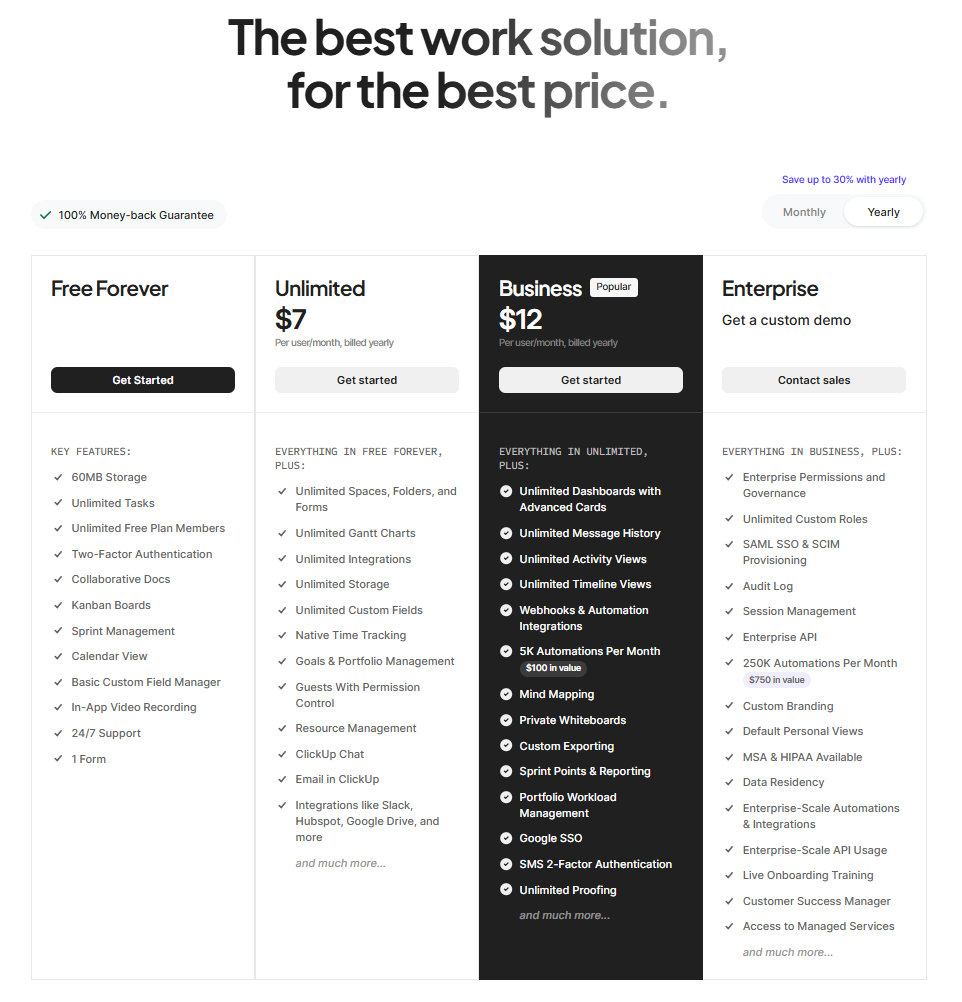
- Cheapest paid entry: ClickUp Unlimited at $7/user/month billed annually
Every remote team eventually outgrows a shared spreadsheet or a wall of sticky notes, and ClickUp, Asana, and Monday.com are the three names that come up most when teams go looking for what’s next. All three do the core job — tasks, projects, deadlines, some automation — but they get there with very different philosophies. ClickUp packs in nearly every feature it can, betting you’ll trade some interface complexity for value. Asana keeps things clean and opinionated, betting non-technical teams will pay a bit more to skip the learning curve. Monday.com leans hardest into visual customization and cross-department flexibility, betting you’ll eventually want it running your CRM or dev pipeline too, not just your task list. None of the three is objectively “best” — the right pick depends on your team’s technical comfort, budget, and how far past project management you expect to grow.
ClickUp vs Asana vs Monday.com: At a Glance
| ClickUp | Asana | Monday.com | |
|---|---|---|---|
| Best for | Teams wanting maximum features per dollar | Non-technical teams wanting a clean, guided experience | Visual teams that may expand into CRM/dev/service use cases |
| Free plan | Unlimited tasks and members, 60MB storage, 5 Spaces | Free for up to 2 users only, unlimited tasks/projects | Free for up to 2 seats, 3 boards |
| Cheapest paid tier | Unlimited: $7/user/mo (annual) / $10/user/mo (monthly) | Starter: $10.99/user/mo (annual) / $13.49/user/mo (monthly), 2-seat minimum | Basic: $9/seat/mo (annual) / $12/seat/mo (monthly), 3-seat minimum |
| Mid tier | Business: $12/user/mo (annual) / $19/user/mo (monthly) | Advanced: $24.99/user/mo (annual) / $30.49/user/mo (monthly) | Standard: $12/seat/mo (annual) / $14/seat/mo (monthly) |
| AI features | Brain AI add-on: $9/user/mo ($7.20 annual); Everything AI: $28/user/mo | AI Studio Basic bundled into paid tiers, capped at 50K-200K credits/billing account/month depending on tier | AI credits bundled into higher tiers (e.g. 20,000 AI credits/month on some plans); usage-capped |
| Learning curve | Moderate to steep — dense settings and nested hierarchy | Easy — one of the most guided onboarding flows in the category | Easy to moderate — visual boards, but customization options add complexity |
| Standout strength | Feature density: native docs, whiteboards, time tracking, goals — all included below Enterprise | Timeline/Gantt views and reporting dashboards feel the most polished of the three | Visual board customization and modular add-on products (CRM, dev, service) |
Pricing verified against each vendor’s own pricing page as of September 2026. All three charge per seat/user and price monthly billing 20-40% higher than annual — confirm the current rate on each vendor’s site before committing to a plan.
ClickUp: Best for Feature Density and Value
ClickUp’s pitch is simple: it wants to replace as many other tools in your stack as possible, and at a lower per-seat price than either competitor. The free plan alone allows unlimited tasks and unlimited members, which is unusually generous for the category, and even the entry-level Unlimited tier ($7/user/month annually) bundles unlimited storage, Gantt charts, native time tracking, goals, and portfolios — features that Asana and Monday.com often reserve for pricier tiers. The tradeoff is a genuinely denser interface: ClickUp has more settings, more nested hierarchy (Spaces, Folders, Lists, and Views all stack), and a real onboarding curve for teams used to something simpler.
- Strongest at: features included per dollar — time tracking, goals, docs, and whiteboards ship well below Enterprise pricing on competitors
- Free plan reality: unlimited tasks and members is genuinely useful, but the 60MB storage cap and 100 monthly automation executions will push active teams toward Unlimited fast
- Watch out for: ClickUp Brain (AI) is a separate $9/user/month add-on on top of any paid plan, not bundled in — factor that into the real per-seat cost if AI features matter to your team
Asana: Best for Non-Technical Teams Wanting a Guided Experience
Asana’s advantage isn’t feature count, it’s polish. Its Timeline and Gantt views, reporting dashboards, and task/subtask structure are consistently rated as the easiest of the major project management tools to pick up without training, and that shows up directly in G2/Capterra scores that skew toward “easy to use” over “powerful.” The catch that trips teams up is the free plan: as of late 2025, Asana’s Personal tier caps out at 2 users, down from its old 10-user ceiling, so most teams of any real size land on the paid Starter tier ($10.99/user/month annually) almost immediately. Asana’s AI Studio is bundled into paid plans rather than sold as an extra product, but it’s rate-limited even on paid tiers — 50,000-200,000 credits per billing account per month depending on plan, shared across the whole team, not per user. See our full Asana AI Studio pricing breakdown for the plan-by-plan request caps.
- Strongest at: onboarding speed and interface polish — the easiest of the three to hand to a non-technical team with minimal training
- Free plan reality: capped at 2 users for new accounts, which makes it a non-starter for anything beyond a very small pair of collaborators
- Watch out for: AI Studio credits are pooled per billing account and capped even on paid tiers — a busy team can burn through the monthly allotment well before the reporting month ends
Monday.com: Best for Visual Customization and Room to Grow
Monday.com’s colorful, spreadsheet-like board view is the most visually customizable of the three, with color-coded status columns, dozens of column types, and templates that make it easy to reshape a board for almost any workflow without touching automation logic. Its bigger differentiator, though, is scope: Monday.com sells adjacent products — monday CRM, monday dev, monday service — built on the same underlying platform, so a team that starts with basic project boards can expand into sales pipeline or software development tracking without switching vendors. That flexibility comes with a 3-seat minimum on every paid plan (a 2-person team still pays for 3 seats) and automation/integration action limits that scale by tier, which can quietly become a bottleneck for heavier automation users on the entry plans.
- Strongest at: visual board customization and a modular product suite (CRM, dev, service) for teams that expect to outgrow plain project management
- Free plan reality: capped at 2 seats and 3 boards — workable only for the smallest possible team, and paid plans require a minimum of 3 seats regardless of actual headcount
- Watch out for: automation and integration actions are capped per month even on the Standard tier (250/month) — teams automating heavily will hit that ceiling faster than expected and need Pro

Which One Should You Actually Pick?
Choose ClickUp if…
- You want the most functionality per seat and don’t mind a bit of setup complexity to get there
- Your team already juggles docs, time tracking, and goals in separate tools you’d like to consolidate
- Budget is a real constraint and you’re comfortable with a moderate learning curve
Choose Asana if…
- Your team is non-technical and needs to be productive with minimal onboarding
- Clean timeline/portfolio views and reporting matter more than raw feature count
- You’re past the 2-user free cap and comfortable paying a premium for polish
Choose Monday.com if…
- You want the most visually customizable board experience of the three
- You expect to expand into CRM, dev, or service workflows on the same platform later
- A 3-seat minimum and moderate automation limits aren’t a dealbreaker at your team size
Frequently Asked Questions
Which one is cheapest overall?
ClickUp is the cheapest entry point at $7/user/month for Unlimited, and its free plan is also the most generous of the three (unlimited tasks and members, versus a 2-user cap on Asana and Monday.com’s free tiers). Asana and Monday.com land close together at their mid tiers, but Monday.com’s 3-seat minimum means small teams sometimes pay more in practice than the sticker price suggests.
Can I import my data if I switch between them later?
All three offer basic CSV import and some native migration tools (ClickUp and Monday.com both have importers built specifically for Asana and Trello, for example), but complex structures — nested subtasks, custom automations, dependencies — rarely survive a migration intact. Budget time to rebuild your more advanced workflows by hand rather than assuming a one-click import will carry everything over.
Do any of them include AI features for free?
Not meaningfully. ClickUp’s Brain AI is a separate paid add-on on every tier. Asana’s AI Studio is bundled into paid plans but rate-limited by shared account credits, not free-standing. Monday.com bundles a capped number of AI credits into some of its higher tiers. None offers unlimited or free AI access — treat any AI feature as a usage-capped bonus, not a core reason to pick one platform over another.
Which is best for a very small team (2-3 people)?
ClickUp’s free plan is the most workable at that size since it doesn’t cap user count, only storage and automation volume. Asana’s free plan is fine for exactly 2 people but breaks the moment you add a third. Monday.com technically allows 2 free seats but requires 3 paid seats the moment you upgrade, which can mean paying for a seat you don’t need.
Final Verdict
There’s no single winner here because these three tools are optimized for different priorities. If cost-per-feature is what matters most and your team can handle a bit of setup complexity, ClickUp delivers the most for the least money. If you want the smoothest possible onboarding for a non-technical team and are willing to pay a premium for that simplicity, Asana is worth the extra cost. And if you want a visually flexible platform that can grow into CRM, dev, or service use cases without switching vendors, Monday.com’s broader product suite makes it the more future-proof pick. All three offer a free trial or free tier, so test the actual day-to-day workflow with your real team before committing to an annual plan.




Pingback: Reclaim.ai vs Motion vs Calendly: Best AI Scheduling Tool (2026)