Remote work was supposed to give people their time back. For a lot of people it did the opposite: the commute disappeared, but it got replaced by a calendar that fills itself with back-to-back video calls, a task list that lives in four different apps, and a nagging sense that “focus time” is something that happens to other people. The tools that used to help — a paper planner, a shared team calendar, sheer willpower — don’t hold up once you’re juggling async handoffs across time zones with nobody in the next cubicle to tap on the shoulder.
This guide breaks down what actually helps remote workers protect their time in 2026 — the AI calendar and task tools worth trying, what separates the useful ones from the ones that just add another dashboard to check, and how to roll one out without it becoming yet another abandoned productivity app. This is the first post in our Time Management for Remote Workers series. Over the next few weeks we’ll publish a step-by-step calendar automation tutorial, a Deep Work playbook, hands-on reviews of Reclaim.ai and Motion, and a head-to-head comparison of Reclaim.ai vs. Motion vs. Calendly — bookmark this page as your starting point and we’ll link everything back here as it goes live.
Why Time Management Breaks Down for Remote Workers
In an office, other people’s calendars act as a soft brake on your own — a colleague’s lunch or a manager’s 1:1 gives you a natural reason to say no to a meeting request. On a distributed team spread across time zones, that social brake disappears, and calendars fill up because nobody is coordinating the whole picture. Three patterns show up again and again on remote teams:
- Meetings expand to fill every open slot. Without a shared sense of someone’s full day, it’s easy to book over what would have been their focus block — nobody can see it was “protected” if it was never marked that way.
- Deep work gets treated as whatever’s left over. Reactive work — Slack messages, quick calls, “got a sec?” pings — happens in real time, so it always wins over unscheduled focus time that has no defender on the calendar.
- Task lists live in five places at once. A calendar, a project tool, a notes app, and a couple of Slack DMs all hold pieces of “what I need to do today,” and reconciling them is itself a time-consuming task.

The tools below don’t fix a broken culture of over-scheduling by themselves, but the good ones make the cost of that culture visible — and automate the defense of your time so it doesn’t depend on you saying no in the moment.
What to Look for Before You Pick One
- Automatic, not manual, focus time. Tools that require you to block your own calendar every week rarely survive a busy month. The best ones defend focus time automatically and reschedule around new meetings.
- Task and calendar in the same view. If your to-do list and your calendar don’t talk to each other, you end up doing the reconciling by hand every morning.
- Works with the calendar you already have. Google Calendar and Outlook/Microsoft 365 support are table stakes — a tool that wants to replace your calendar outright is a much harder sell to a team.
- Visibility without micromanagement. Time tracking and analytics should help you notice your own patterns (meeting overload, constant context-switching), not become a surveillance tool pointed at your team.
- A real free tier or trial. Time-management tools are a habit before they’re a budget line — you want to know it sticks before you pay for a team.
The Tools Worth Knowing in 2026
One quick note before the list: if you were a Clockwise user, it’s no longer an option — Salesforce hired Clockwise’s team in March 2026 and the product itself shut down on March 27, 2026, with Clockwise directing its customers to migrate to Reclaim.ai. That’s part of why Reclaim tops the list below.
Reclaim.ai — the AI calendar that defends focus time automatically
Reclaim.ai plugs into Google Calendar (Outlook is in beta) and automatically schedules and reschedules Focus Time, habits, buffer time, and 1:1s around your real meetings — if something new gets booked over a protected block, Reclaim quietly moves the block instead of just leaving it double-booked. It’s the closest thing to a “set it and forget it” defense against a calendar that fills itself.
Motion — task list, project planner, and calendar in one AI-scheduled view
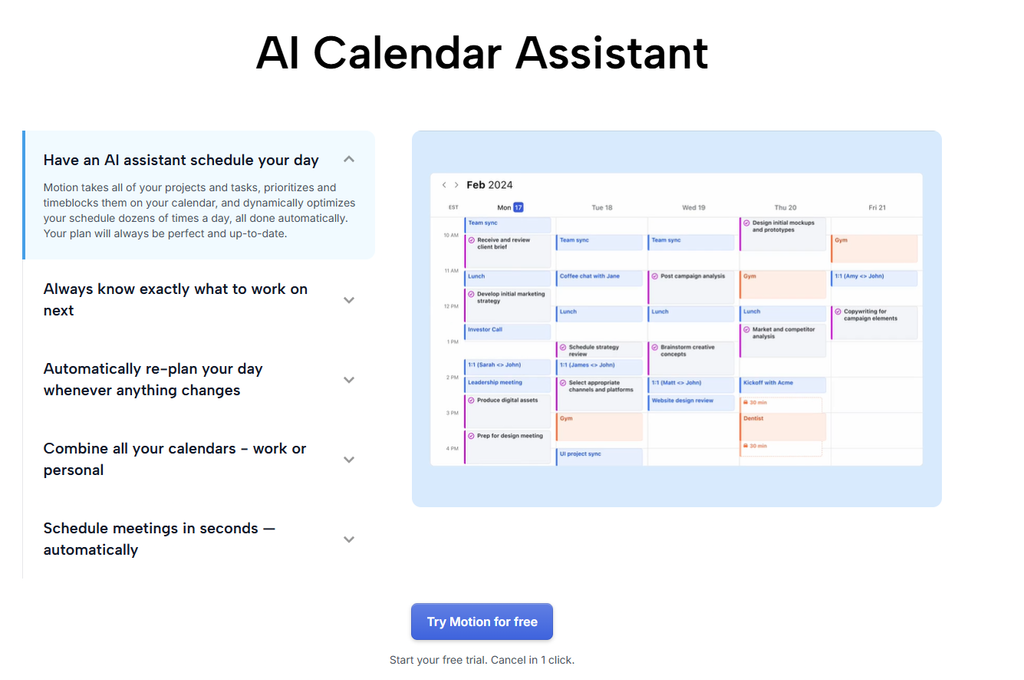
Motion goes further than a calendar tool: give it a task list with deadlines and estimated durations, and its AI planner slots each task into open time on your calendar automatically, re-planning your whole day whenever something changes. It also layers in project and document features, so it can replace a separate lightweight project tool for a solo operator, not just protect focus time.
Sunsama — a guided daily planning ritual, not a set-and-forget tool
Sunsama pulls tasks in from tools like Asana, ClickUp, Trello, and Gmail, and walks you through a short daily and weekly planning ritual to decide what actually fits in the day — deliberately capping how much you commit to rather than auto-filling every gap. It suits people who find full automation a little too hands-off and want a few minutes of intentional planning built into the habit.
RescueTime — automatic time tracking that shows where your day actually goes
RescueTime runs quietly in the background and automatically logs time spent in every app and website, no manual timers required, then turns that into daily/weekly reports and a distraction-blocking Focus Session mode. It’s less about scheduling your day upfront and more about showing you the gap between how you think you spend your time and how you actually do — often the first step before any of the scheduling tools above will stick.
Calendly — scheduling links that remove the back-and-forth entirely
Calendly solves a narrower but very real time drain: the five-email thread just to land on a meeting time. Share a booking link tied to your real availability and let the other person pick a slot — for remote teams that book a lot of external meetings (sales calls, client check-ins, candidate interviews), it removes a genuinely large chunk of coordination overhead. It’s not a focus-time tool on its own, but it’s the piece that keeps Reclaim’s or Motion’s protected blocks from getting undone by an external scheduling request.
Pricing at a Glance
| Tool | Best For | Pricing | Free Plan? |
|---|---|---|---|
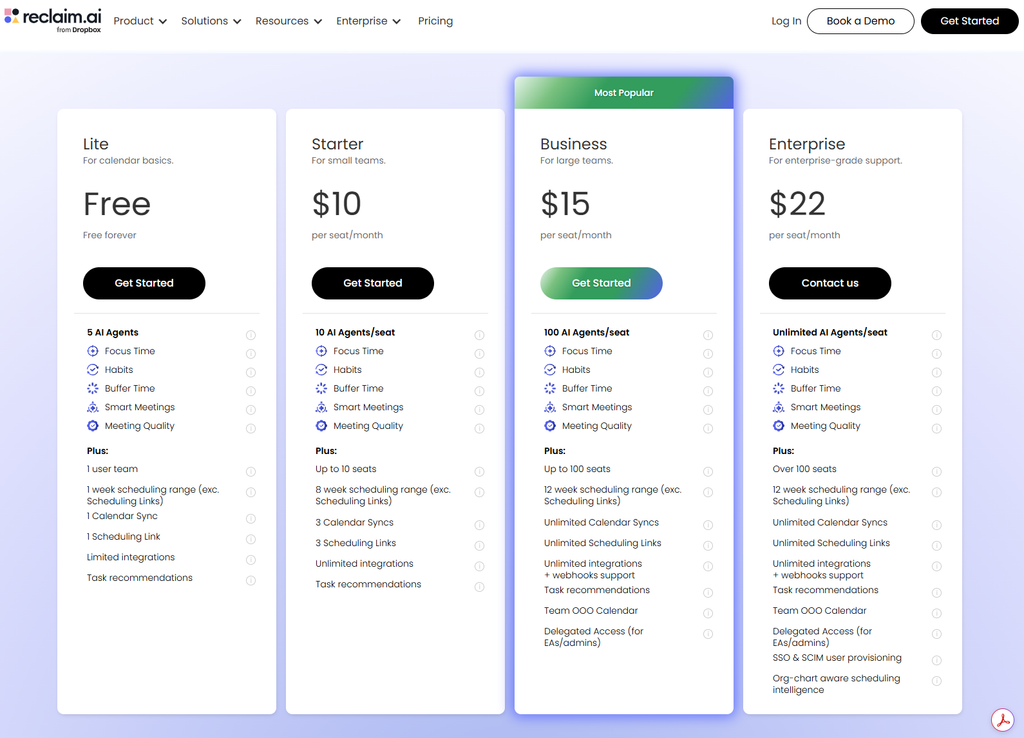
| Reclaim.ai | Automatic focus-time defense on Google Calendar | Free (Lite, 1 user); Starter $10/seat/mo (annual); Business $15/seat/mo (annual) | Yes |
| Motion | AI-scheduled tasks, projects, and calendar in one view | Pro AI $19/seat/mo (annual); Business AI $29/seat/mo (annual) | No (free trial only) |
| Sunsama | Guided daily/weekly planning ritual | Pro $17/mo (annual) or $22/mo (monthly) | No (14-day trial) |
| RescueTime | Automatic time tracking and distraction blocking | Solo Focus $7/mo (annual); Solo+ (adds timesheets) $12/mo (annual); Team Focus $10/user/mo (annual) | No (free trial only) |
| Calendly | Scheduling links for external meetings | Free; Standard $10/seat/mo (annual); Teams $16/seat/mo (annual) | Yes |
Pricing confirmed against each vendor’s own pricing page as of publication; annual-billing rates are shown where a tool offers both, since monthly billing typically costs 20-30% more. Rates change often, so double-check current pricing before you commit a team to one.
How to Roll One of These Out Without It Becoming Another Abandoned App
Time-management tools have a uniquely high abandonment rate — they only work if you actually let them run your calendar, and that’s a bigger leap of trust than adopting a new project tracker. A rollout that actually sticks:
- Start with one tool solving one problem — pick focus-time defense (Reclaim/Motion) or time awareness (RescueTime), not both at once. Layering multiple new habits at the same time is the fastest way to abandon all of them.
- Run it on your own calendar for two weeks before suggesting it to the team. You need to trust that it won’t double-book you before you can vouch for it to anyone else.
- Set the “meeting-free” or focus-time rule at the team level, not just the individual level — a tool that protects your calendar doesn’t help if a teammate can still book straight over a slot it created.
- Revisit after a month with real data (Focus Time hours reclaimed, RescueTime’s productivity score, or Motion’s completed-task rate) rather than a gut feeling — the numbers are usually the thing that convinces a skeptical manager to keep paying for it.

Frequently Asked Questions
Do I need an AI calendar tool, or can I just block time manually?
Manual blocking works fine until your calendar changes — the moment a new meeting gets booked over a manual block, most people just let it slide rather than going back to re-block time elsewhere. The value of tools like Reclaim and Motion isn’t the initial block, it’s the automatic rescheduling every time something new comes in.
What happened to Clockwise, and is Reclaim.ai a safe replacement?
Clockwise shut down on March 27, 2026 after Salesforce hired its founding team for its Agentforce group — Salesforce acquired the people, not the product, and Clockwise’s own farewell post directed its roughly 40,000 customer organizations to migrate to Reclaim.ai, which offered price matching for the transition. Reclaim covers the same core use case (automatic Focus Time defense on Google Calendar) and remains an independently run product as of publication.
Which tool should a solo remote worker start with?
If you just want your focus time to stop getting quietly erased, start with Reclaim.ai’s free Lite plan — it covers one user at no cost. If you also want your task list and calendar merged into one AI-planned day, Motion is worth the paid trial instead.
Final Takeaway
No AI tool fixes a team culture that treats every hour as bookable — but the right one makes the cost of that culture visible and automates the part of the fight you shouldn’t have to win manually every week. Start with the single biggest leak in your own day (a calendar that fills itself, a task list scattered across apps, or simply not knowing where your hours go) and pick one tool to close it. We’ll be publishing a step-by-step calendar automation tutorial, a Deep Work playbook, hands-on reviews of Reclaim.ai and Motion, and a full Reclaim.ai vs. Motion vs. Calendly comparison over the next few weeks — this page will link out to each as it goes live.




Pingback: The Deep Work Playbook for Remote Workers | The Deskless Daily
Pingback: How to Automate Your Calendar (Step-by-Step Guide) - The Deskless Daily