Quick Verdict
- Pick Slack if: your team already lives outside Microsoft 365, you want the most polished pure-chat experience, and you’re fine paying separately for email/files/video elsewhere.
- Pick Microsoft Teams if: you’re already on Microsoft 365 (Outlook, Word, Excel, SharePoint) — Teams comes bundled in for as little as $1.60-$3.20/user/month extra, which is hard to beat on pure cost.
- Best AI chat assistant: roughly tied — Slack’s AI (Pro/Business+) summarizes channels and huddles; Microsoft 365 Copilot (a separate paid add-on) reaches across Teams, Outlook, Word, and Excel at once.
- Cheapest paid entry with real chat + video: Microsoft Teams Essentials at $4/user/month (standalone, no Office apps) narrowly beats Slack Pro at $7.25/user/month.
Slack and Microsoft Teams both do the same basic job — move work chat out of email and into channels, threads, and huddles — but they get there from opposite directions. Slack was built as a standalone chat tool and still feels like one: fast, focused, built around channels and integrations. Teams was built as part of Microsoft 365 and still feels like one too: it shows up bundled with Outlook, Word, Excel, and SharePoint, and its pricing only makes sense in that context. Picking between them usually isn’t really a chat-features debate — it’s a question of what you’re already paying for and how deep your team is into either ecosystem. Here’s how they actually compare on features, AI, and current (October 2026) pricing.
Slack vs Microsoft Teams: At a Glance
| Slack | Microsoft Teams | |
|---|---|---|
| Best for | Teams that want chat as the primary hub, with deep integrations into other tools | Teams already on Microsoft 365 who want chat, meetings, and Office apps in one place |
| Free plan | Free: 90-day searchable message history, unlimited 1:1 huddles, basic integrations | Teams Free: unlimited chat/meetings for up to 60 minutes group calls, 5GB storage |
| Cheapest paid tier | Pro: $7.25/seat/mo (annual) / $8.75 (monthly) | Teams Essentials (standalone): $4/seat/mo (annual) |
| Cheapest tier with Office apps bundled | N/A — Slack doesn’t sell Office-style apps | Microsoft 365 Business Basic (incl. Teams): $7/seat/mo (annual) |
| Mid tier | Business+: $15/seat/mo (annual) / $18 (monthly) | Microsoft 365 Business Standard (incl. Teams): $14/seat/mo (annual) |
| Built-in AI | Slack AI: channel/thread summaries, huddle notes (Pro), search & workflow AI (Business+) — no separate add-on fee | Microsoft 365 Copilot: separate add-on, $21/seat/mo list (promotional $18/seat/mo through Dec 2026) |
| Video calls | Huddles — lightweight, audio-first with optional video/screen share, no time limit | Full Teams Meetings — scheduled video calls, webinars, up to 1,000 attendees on paid tiers |
| Office document editing | None native — integrates with Google Workspace/Microsoft 365 via apps | Native — Word, Excel, PowerPoint open and co-edit directly inside Teams |
| Enterprise tier | Enterprise Grid — custom pricing | Microsoft 365 E3/E5/E7 (incl. Teams) — $39/$60/$99 per seat/mo (annual) |
Pricing confirmed via Microsoft’s official commercial pricing update (effective July 1, 2026) and Slack’s own pricing/help pages as of October 2026. Microsoft’s Copilot add-on bills separately from the base Business Basic/Standard/Premium plans — some resellers advertise a bundled “with Copilot” rate (e.g. ~$23.50/seat/mo for Business Standard), but that’s simply the base plan plus the promotional Copilot add-on rate stacked together, not a distinct cheaper SKU. Always check whether a quoted Teams price already includes Copilot or not.
Slack: Best for Chat-First Teams Outside the Microsoft Ecosystem
Slack’s whole design philosophy is that chat should be the center of work, not a bolt-on to email and calendars. Channels are organized around topics or projects rather than people, threads keep side conversations from burying the main channel, and Huddles make dropping into a quick audio call as fast as a Slack message. Slack also has the deepest third-party app ecosystem of any workplace chat tool — Google Drive, Asana, Zapier, GitHub, and thousands of others plug in natively, which matters a lot for teams not standardized on Microsoft 365.
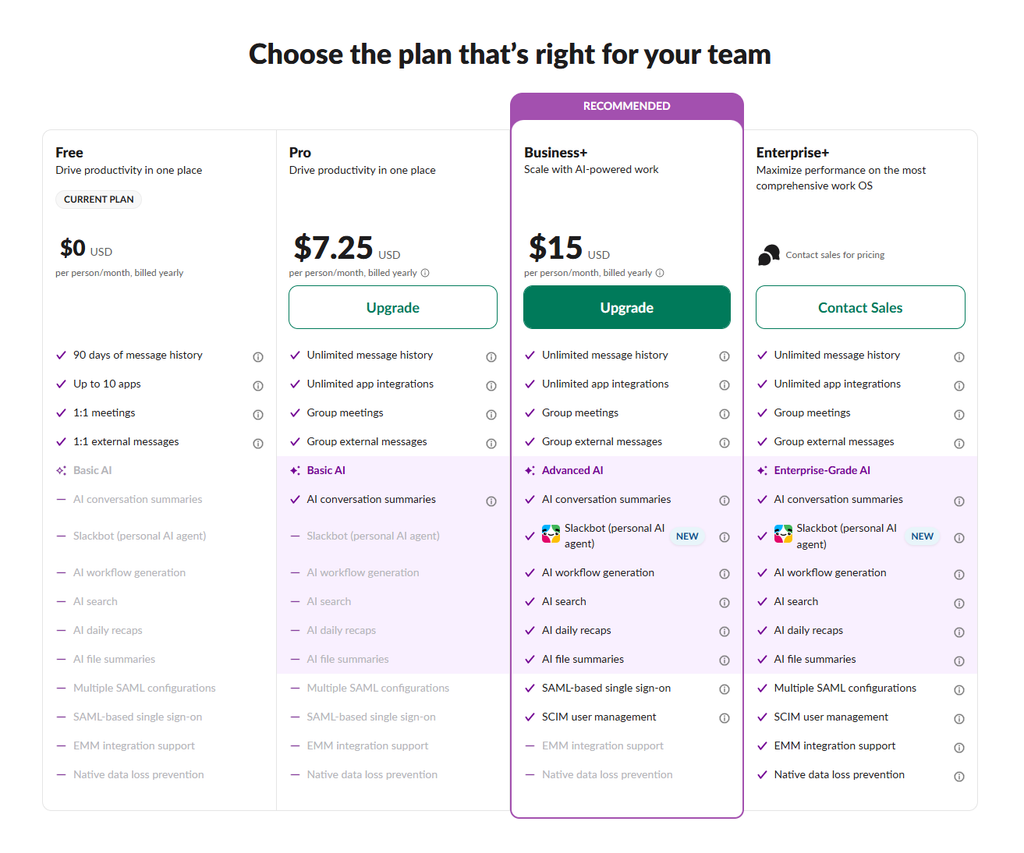
Slack AI, included (not a separate add-on) starting on the Pro plan, summarizes long channels and threads, recaps huddles, and — on Business+ — can search across your whole workspace and power simple AI workflows. A new Slackbot personal-agent feature is also rolling out, with limited trial access on Free/Pro and ongoing access on Business+/Enterprise+. The tradeoff: Slack doesn’t sell email, document storage, or Office-style apps, so unless your team is already on Google Workspace or a separate Microsoft 365 subscription, you’re paying for those elsewhere on top of Slack.

Slack Pros
- Cleanest, fastest pure-chat interface of the two; threads and channels are easy to scan
- Largest third-party integration marketplace (2,600+ apps)
- Slack AI (summaries, huddle notes, workspace search) is included in plan price, not a separate add-on
- Huddles are lighter-weight than scheduled video meetings for quick questions
Slack Cons
- No native Office-style document editing — needs a separate Google Workspace or Microsoft 365 subscription
- Free plan only keeps 90 days of message history, not full searchable history
- Costs more than Teams once you account for a team already paying for Microsoft 365 anyway
Microsoft Teams: Best for Teams Already Paying for Microsoft 365
Microsoft Teams isn’t really sold as a standalone chat app, even though a standalone “Essentials” tier technically exists. Its real value shows up once a team is already on Microsoft 365: Teams is bundled into Business Basic, Standard, and Premium plans, so the chat/meetings layer effectively costs $1.60-$3.20 per user per month on top of the no-Teams version of the same plan, not a full separate subscription. For a team already paying for Outlook, Word, Excel, and SharePoint, that’s a hard price to beat — and documents open and co-edit natively inside Teams channels rather than through an integration.
Microsoft 365 Copilot is Teams’ answer to Slack AI, but it’s priced and packaged very differently: it’s a separate add-on at $21/seat/month list price (discounted to $18/seat/month under a promotion running through December 2026), layered on top of whichever base plan you’re already on — not a built-in plan tier. Copilot’s advantage is scope: it can summarize a Teams meeting, then draft a follow-up email in Outlook and update a status doc in Word using the same meeting’s context, something Slack AI can’t do since Slack has no native Office apps to reach into. Teams’ meeting experience is also the heavier of the two by design — scheduled calls, webinars, and up to 1,000 attendees on paid tiers, versus Slack’s lighter Huddles.

Microsoft Teams Pros
- Bundled into Microsoft 365 Business plans for a small incremental cost if you’re already a Microsoft 365 customer
- Native Word/Excel/PowerPoint co-editing directly inside channels — no separate app needed
- Heavier-duty meeting features (webinars, large attendee caps) than Slack’s Huddles
- Copilot can act across Teams, Outlook, Word, and Excel in one context, not just inside chat
Microsoft Teams Cons
- Copilot is a separate add-on fee on top of the base plan, unlike Slack AI’s included pricing
- Chat/channel UI is more cluttered and slower-feeling than Slack’s for pure messaging
- Smaller third-party integration ecosystem than Slack outside Microsoft’s own apps
- Pricing is genuinely confusing — base plan, “with Teams” vs “no Teams” SKUs, and Copilot add-on all stack separately
Which One Should You Actually Pick?

Choose Slack if…
- Your team isn’t standardized on Microsoft 365 (e.g. you use Google Workspace instead)
- Chat speed and integrations matter more to you than native document editing
- You want AI features included in your plan price, not a separate add-on
Choose Microsoft Teams if…
- You’re already paying for Microsoft 365 (Outlook, Word, Excel, SharePoint)
- You want documents and chat in one place instead of switching to a separate app
- You run larger scheduled meetings or webinars regularly
Consider both if…
- Different departments already have strong preferences (e.g. engineering on Slack, finance on Teams)
- You’re mid-migration between Google Workspace and Microsoft 365
- You want to trial Copilot without giving up Slack’s integrations yet
Frequently Asked Questions
Is Microsoft Teams really cheaper than Slack?
Only if you’re already paying for Microsoft 365 — then Teams is effectively $1.60-$3.20/user/month extra on top of a plan you already have. Compared standalone, Teams Essentials ($4/seat/mo) is cheaper than Slack Pro ($7.25/seat/mo), but it’s a much thinner product with no Office apps, no AI, and a smaller feature set than either Slack Pro or a Microsoft 365 Business plan.
Does Teams or Slack have better AI?
It depends on scope versus cost. Slack AI is included in Pro/Business+ plan pricing and does a solid job summarizing channels, threads, and huddles. Microsoft 365 Copilot costs extra ($21/seat/mo list, $18 promotional) but can act across Teams, Outlook, Word, and Excel at once — useful if your team’s work already spans those apps, overkill if it doesn’t.
Can I use Slack and Microsoft Teams together?
Technically yes, but it’s rarely worth it long-term — most teams end up with messages split across two tools and people unsure where to post. It’s more common during a transition period (e.g. migrating from one to the other) than as a permanent setup.
Did Slack’s AI pricing change recently?
Yes. Salesforce discontinued the standalone Slack AI add-on (previously ~$10/user/month) in June 2025 and folded AI features into the base Pro and Business+ plans by each customer’s first renewal after August 17, 2026. That’s why Slack AI no longer shows up as a separate line item the way Microsoft 365 Copilot still does.
Final Verdict
Slack and Microsoft Teams aren’t really fighting over the same buyer anymore. If your team runs on Google Workspace or no single productivity suite at all, Slack’s chat-first design, lighter Huddles, and included AI make it the simpler, faster-feeling tool — and you’re not paying extra for Office apps you won’t use. If your team is already writing in Word, building in Excel, and living in Outlook, Teams’ bundled pricing is genuinely hard to beat, and Copilot’s ability to work across all of those apps (for an added fee) is a real advantage Slack can’t match on its own. The deciding question isn’t “which chat app is better” — it’s “what are we already paying Microsoft or Google for,” since that answer determines which tool is actually the cheaper, more integrated choice for your team. For more on setting communication norms once you’ve picked a tool, see our Async Communication Playbook.