It’s 11:47pm for your teammate in Lisbon when they finally get to your Slack message. It’s tagged “quick question,” has no context, and ends with a bare “?” — so now they’re deciding whether to answer half-asleep or leave you hanging until morning, and either way somebody loses. This isn’t a tooling problem. Your team already has Slack, email, and a project tracker. It’s a norms problem: nobody ever wrote down what’s actually urgent, which channel a message belongs in, or how long it’s fair to wait for a reply — so everyone guesses, and the guesses don’t match.
Distributed teams already run mostly async by default — research on remote communication patterns puts the share of remote team communication that happens asynchronously at roughly 65% — but far fewer teams have actually agreed on how it should work, which is why the same status update gets read as calm by one person and as pressure by another. This playbook is the rule set: six concrete norms you can put in place this week, with no new software required. It pairs with our async-first meetings playbook (which cuts meeting time specifically) and our documentation-first ops playbook (which covers where decisions get written down) — this one covers the day-to-day messaging layer between those two.
Why This Needs Written Rules, Not Just “Good Judgment”
Every remote team already has communication norms — they’re just unwritten, which means everyone is running a slightly different version. One person thinks a Slack DM deserves a reply within the hour; another treats it like email and gets to it by end of day. Neither is wrong until the two of them are on the same team, and then it’s a source of quiet resentment on both sides. Teams that write these rules down and actually apply them see the difference show up in hard numbers: one 2026 analysis of async-first versus sync-heavy remote teams found 22% fewer unnecessary meetings, 18% more deep-work hours per week, and higher self-reported productivity for the teams with explicit async norms. Separately, a 2026 survey on async work found an 8:1 ratio of workers reporting productivity gains over losses from async-first practices — but that same research is clear the gains aren’t automatic; they show up specifically for teams that treat async as a deliberate system, not just “we don’t have to be online at the same time.”
The six rules below are the version of that system we’d recommend starting with. None of them require a new tool — they require a short conversation with your team and a place to write the result down (a pinned Slack message, a Notion page, or a paragraph in your onboarding doc all work).
Rule 1: Every Message Gets an Explicit Urgency Level

The single biggest source of async friction is that urgency is invisible by default — a message reads exactly the same whether it can wait three days or needs an answer in ten minutes, so the reader has to guess, and anxious guessers over-respond while relaxed guessers under-respond. Fix this by making urgency a visible, agreed-on label instead of a feeling:
- 🔴 Urgent — genuinely blocking, needs a reply within an agreed short window (define the window as a team, e.g. 30-60 minutes during working hours). Reserve this for things that actually justify interrupting someone’s focus block.
- 🟡 Normal — needs a reply, but within the day is fine. This is the default for most work messages.
- 🟢 No rush — FYI, or answerable whenever — explicitly signals “do not feel obligated to drop what you’re doing.”
The label can be a word, an emoji, or a prefix like “[urgent]” — the format matters far less than everyone agreeing to actually use it and to trust it. A team that labels honestly (not marking everything urgent “just in case”) is what makes the label worth reading.
Rule 2: Set — and Publish — Expected Response Times by Channel
Urgency labels only work if there’s also a shared understanding of what “normal” response time means for each tool your team uses, because the same message type gets different treatment depending where it lands. A reasonable starting point most remote teams converge on:
- Slack/Teams chat: within the same working day, faster only if flagged urgent.
- Email: within 24 business hours — email is inherently slower-paced and everyone should treat it that way.
- Project tool comments (Asana, ClickUp, Notion): within 1-2 business days — these are for decisions and documentation, not live conversation.
- Direct @mentions on a specific task: tighter than a general channel post — treat as “normal” urgency by default.
Write these numbers down somewhere new hires will actually see them (onboarding doc, pinned channel message) rather than leaving them as tribal knowledge only the original team knows. Slack’s own guidance for remote onboarding specifically calls out setting expectations for response time in async channels as a first-week manager task — it’s not something people should have to infer by watching who gets snapped at for a slow reply.
Rule 3: One Channel, One Purpose — No Guessing Where Things Go
Channel sprawl (the same topic scattered across Slack, email, and comments) is what makes async communication feel chaotic even when every individual message was reasonable. Give each message type exactly one home:
- Decisions and their reasoning → the project tool or a docs page, never buried in a chat thread that will scroll away.
- Quick questions and day-to-day chatter → team chat, in the right channel (not DMs, so context stays visible to the team).
- Formal requests to people outside the immediate team → email.
- Status updates → a single recurring format (a channel, a doc, or an async standup thread) — not scattered wherever someone happens to post that day.
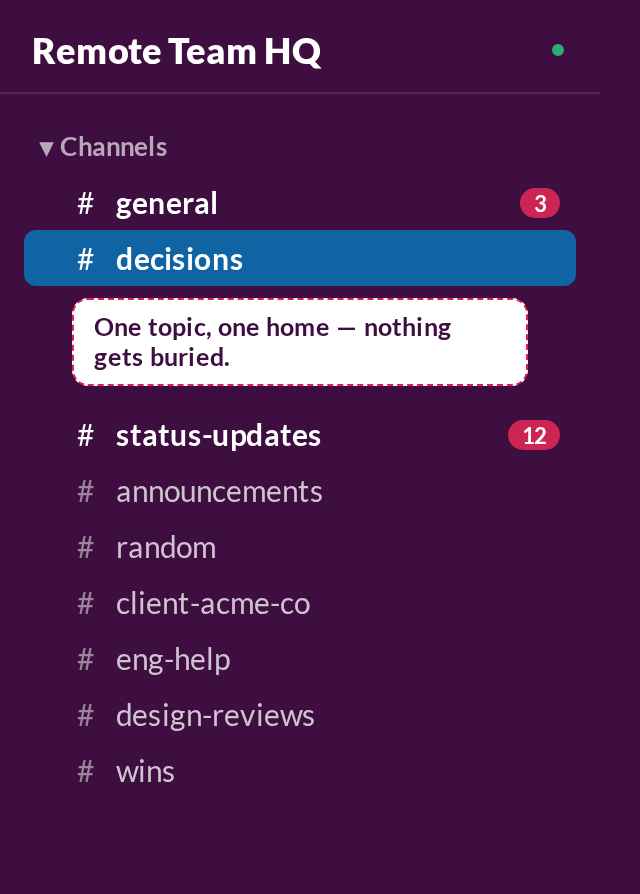
When someone posts a decision-worthy question in the wrong place, the fix isn’t to answer it there — it’s to redirect it (“let’s move this to the #project-x channel so it’s findable later”) and actually follow through, even though answering in place feels faster in the moment.
Rule 4: Default to Overcommunicating Context, Not Brevity
“Got a sec?” and “quick question” are the two async messages most likely to sit unanswered, because they ask for a commitment before revealing what it costs. Async messages should be able to stand alone without a live follow-up conversation:
- State the question and the context in the same message — not “can we talk about the client deck?” but “the client deck needs the Q3 numbers updated before Friday — can you confirm the new figures by end of day tomorrow?”
- Include what you’ve already tried if you’re asking for help, so the responder isn’t reconstructing your steps before they can even start answering.
- Offer a default when asking someone to decide something (“I’d lean toward option B unless you see a problem — let me know by Thursday or I’ll go with it”) so silence itself becomes a usable outcome instead of a stall.
This runs opposite to most advice about keeping messages short — and it should. A slightly longer message that can be fully answered in one reply saves far more total time than a short one that costs three round trips of clarifying questions across time zones.
Rule 5: Protect a Real-Time Overlap Window — and Use It Only for What Actually Needs It

Async-first doesn’t mean never-synchronous. Global teams still benefit from a shared window where live conversation is possible, precisely because it makes the rest of the day safely async. One 2026 global work trends report specifically recommends setting one primary overlap window of 2-4 hours a day for the handful of things that genuinely need real-time back-and-forth — live decisions with real disagreement, sensitive conversations, and fast-moving incidents.
- Publish the window on the team calendar so everyone (including new hires) knows when it is without asking.
- Guard it for things that need it — a status update that could be a written comment shouldn’t eat into the one shared window a globally distributed team gets.
- Everything outside the window is fair game to be fully async — no one should feel obligated to be reachable outside it just because a tool makes it technically possible.
Rule 6: Write the Rules Down and Revisit Them Quarterly
None of the five rules above survive as “the way we do things” if they only live in one manager’s head. Put them in a single, short, findable document — a communication charter — and treat it the same way you’d treat an onboarding checklist: shown to every new hire in week one, and revisited as a team every quarter, because norms that made sense at 5 people often don’t hold at 15.

Keep the charter itself short enough that people actually read it — a table with channel, purpose, and expected response time covers most of what matters:
| Channel | Use for | Expected response time |
|---|---|---|
| Slack/Teams — direct message or @mention | Quick questions, day-to-day coordination | Same working day (faster only if flagged 🔴 urgent) |
| Slack/Teams — general channel post | Broadcasts, FYIs, non-blocking updates | No obligation to reply; read within the day |
| Formal or external requests | Within 24 business hours | |
| Project tool comment (Asana/ClickUp/Notion) | Decisions, task-specific questions, documentation | 1-2 business days |
| Shared overlap window (live call/chat) | Real disagreements, sensitive topics, incidents | Real-time, by definition |
Common Mistakes to Avoid
- Marking everything urgent “just to be safe.” Once urgency labels get used loosely, people stop trusting them, and you’re back to guessing — the whole system only works if urgent stays rare.
- Writing the charter once and never mentioning it again. New hires won’t discover unwritten norms by osmosis any faster than they’d discover written ones nobody points them to — actively walk new team members through it in week one.
- Confusing “async-first” with “no real-time contact at all.” Removing the shared overlap window entirely tends to slow down exactly the handful of conversations that genuinely need to be live — keep a window, just use it sparingly.
- Letting leadership model the opposite of the rules. If a manager routinely expects instant Slack replies outside the agreed window, the written charter won’t override the norm employees actually see enforced.
- Optimizing messages for brevity over completeness. A short message that triggers three rounds of clarifying questions costs more total time across time zones than one longer message that can be answered in a single reply.
FAQ
Do these rules only apply to fully remote, multi-timezone teams?
They help most for distributed teams spanning time zones, but the underlying problem — invisible urgency and unwritten response-time expectations — shows up on any remote or hybrid team, even one working the same hours. A team in a single time zone still benefits from Rules 1-4; the shared overlap window in Rule 5 matters more the more spread out your team is.
What if my manager expects instant replies regardless of what we agree as a team?
Raise it directly rather than quietly working around it — a written charter is genuinely hard to enforce if the person with the most influence over norms doesn’t follow it. Framing it around the productivity numbers (fewer unnecessary meetings, more deep-work hours) tends to land better than framing it as a personal boundary request.
How do we handle someone who consistently responds late even with clear rules in place?
First check it’s actually a rule-clarity problem and not a workload or timezone-overlap problem — someone juggling too much or genuinely offline during your “normal” window needs a workload or scheduling fix, not a reminder. If the rules are clear and reasonable and it’s still happening, treat it like any other missed expectation: a direct one-on-one conversation, not a passive-aggressive public nudge.
Should we use a tool to enforce this, like an SLA bot?
Not to start. All six rules work with tools your team already has — the charter itself and consistent modeling of it do more than any bot reminder. If response-time misses become a real recurring problem once the rules are in place, that’s worth revisiting, but starting with a tool tends to substitute for the harder conversation about actually agreeing on the norms.
The Bottom Line
Most remote teams already communicate mostly asynchronously by default — the problem is almost never the lack of async tools, it’s the lack of agreed rules for how to use them. Label urgency honestly, set and publish response-time expectations by channel, give every message type exactly one home, write messages that can stand alone, protect one real overlap window instead of staying always-on, and put all of it in a short charter you actually revisit. None of it costs anything to start, and teams that do it consistently report fewer unnecessary meetings and meaningfully more real focus time than teams running the same tools without any agreed rules.




Pingback: Slack vs Microsoft Teams: Best Communication Hub 2026