Quick Verdict
- Pick Reclaim.ai if: you already have a full calendar and want AI to auto-defend focus time, habits, and 1:1s around your existing meetings, without paying a lot for it.
- Pick Motion if: you want AI to also run your task list and projects, not just protect calendar blocks — it plans your whole day, not only what’s already scheduled.
- Pick Calendly if: your main problem is external people booking time with you (clients, candidates, prospects), not internal focus-time protection.
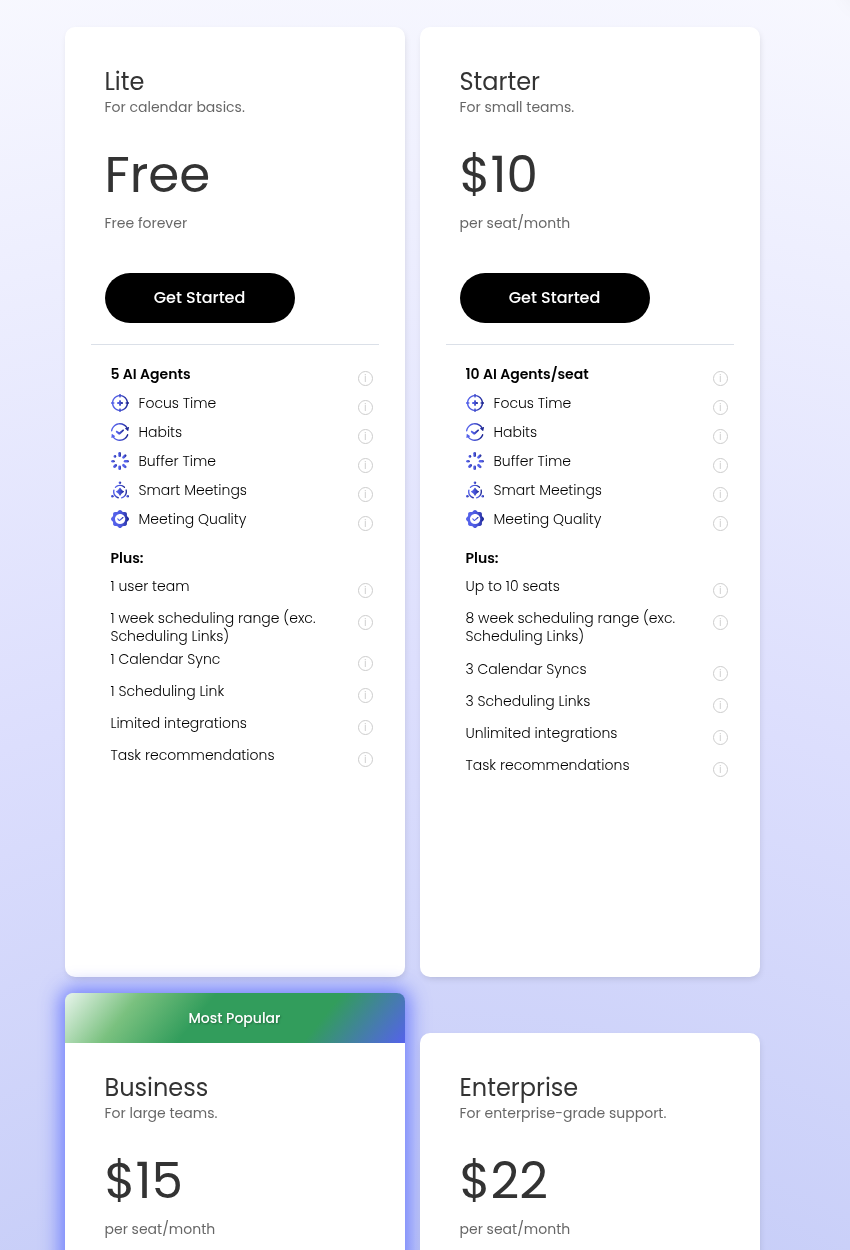
- Cheapest paid entry: Reclaim.ai Starter at $10/seat/month billed annually.
Every “AI calendar” tool promises to give you your time back, but Reclaim.ai, Motion, and Calendly are actually solving three different problems. Reclaim.ai works inside your existing calendar, auto-scheduling focus time, habits, and buffer blocks around meetings you already have. Motion goes a step further and tries to run your entire day — tasks, projects, and calendar — with AI making the calls on what gets worked on and when. Calendly isn’t really competing with either one on autoscheduling; it solves the much narrower problem of letting other people book time with you without an email back-and-forth. Picking the wrong one means paying for features you’ll never touch, so this comparison breaks down what each tool actually does best, what it costs today, and who should pick which.
Reclaim.ai vs Motion vs Calendly: At a Glance
| Reclaim.ai | Motion | Calendly | |
|---|---|---|---|
| Best for | Protecting focus time, habits, and buffers around an existing calendar | AI-managed full-day planning across tasks, projects, and meetings | External meeting booking links and lead routing |
| Core job | Auto-schedules smart blocks (Focus Time, Habits, 1:1s) around fixed meetings | Auto-schedules your entire task list and projects, timeboxing everything on your calendar | Lets others book time on your calendar via a shareable link, with no task/project layer |
| Free plan | Lite: free forever, 1 user, 1 calendar sync, 1 scheduling link | None — free trial only, no permanent free tier | Free: 1 event type, 1 calendar connection, 1-on-1 scheduling only |
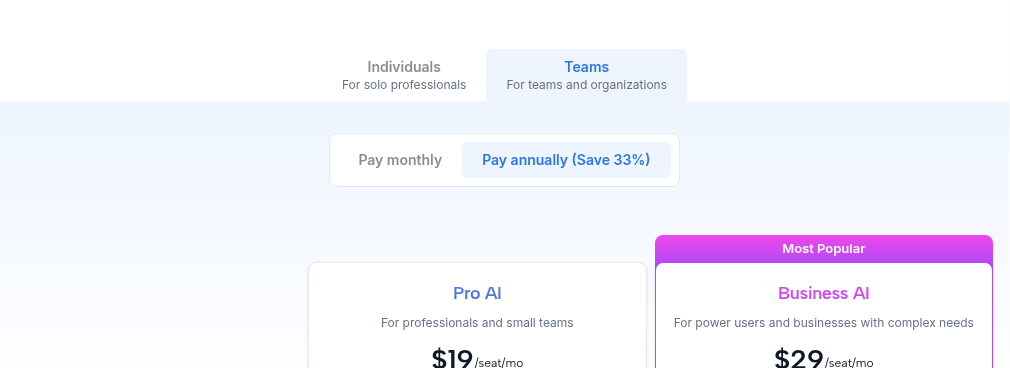
| Cheapest paid tier | Starter: $10/seat/mo (annual), up to 10 seats | Pro AI: $19/seat/mo (annual, Teams) / $29/mo (annual, Individuals) | Standard: $10/seat/mo (annual) |
| Mid tier | Business: $15/seat/mo (annual), up to 100 seats | Business AI: $29/seat/mo (annual, Teams) / $39/mo (annual, Individuals) | Teams: $16/seat/mo (annual) |
| Task/project management | Basic task sync from Todoist, Asana, ClickUp, etc. — not a native task manager | Full native task and project manager with AI prioritization and Gantt charts | None — scheduling only, no task layer at all |
| Meeting AI | Smart Meetings finds optimal times; no built-in notetaker | AI Meeting Assistant and Notetaker included on paid tiers | Notetaker (recaps/transcripts) and Callie (AI scheduling assistant), both in beta as add-ons |
Pricing verified against each vendor’s own pricing page as of September 2026. Reclaim.ai and Calendly seat prices are billed annually; Motion’s Teams-tab rate ($19/$29 per seat, annual) is its lower published price, but its Individuals-tab rate for the same two plans is $29/mo and $39/mo — the pricing page defaults to Teams, which has confused reviewers before. Confirm the current rate and which tab applies to you before committing to a plan.
Reclaim.ai: Best for Defending Time You Already Have
Reclaim.ai‘s whole premise is that your calendar is probably already full of real meetings, and what’s missing isn’t a scheduler — it’s a bodyguard for the time in between. It auto-creates and defends “smart” events: Focus Time blocks that flex around new meetings instead of getting steamrolled by them, recurring Habits (like a workout or weekly planning session) that reschedule themselves rather than just disappear when something conflicts, and Buffer Time around back-to-back calls. It also handles 1:1 scheduling and can auto-negotiate times with people outside your organization who use Reclaim or a synced calendar. What it deliberately doesn’t try to be is a task manager — it can sync tasks in from Todoist, Asana, ClickUp, and similar tools and timebox them, but it’s not where you’d create and manage a project plan from scratch.
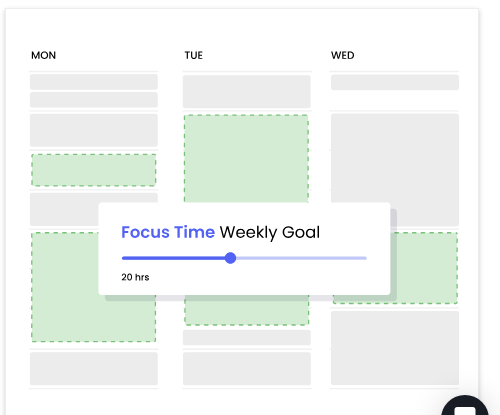
- Strongest at: protecting recurring commitments (focus blocks, habits) from meeting creep without you manually re-defending them every week
- Free plan reality: Lite is genuinely free forever, but it’s capped at 1 user, 1 calendar sync, and a 1-week scheduling range — workable for testing, not for daily team use
- Watch out for: it’s not a task manager; if you need AI to actually plan and prioritize a project’s tasks (not just protect calendar time), you’ll outgrow it toward something like Motion
Black Friday / Cyber Monday note: Reclaim.ai doesn’t have a public track record of running a dedicated Black Friday or Cyber Monday sale. Its standing discounts are a 29% cut for billing annually instead of monthly, plus 20%-off programs for startups, nonprofits, and teams switching from a competitor (each good for 6 months to 3 years, per Reclaim’s own pricing pages). If a seasonal deal shows up this year, it’ll appear at reclaim.ai/pricing; until then, annual billing is the most reliable way to lower the $10/seat/month Starter price.
Motion: Best for Letting AI Run Your Whole Day
Motion‘s pitch is bigger than Reclaim’s: instead of protecting time around your existing plan, it wants to build the plan itself. Feed it a task list and deadlines, and its AI Task Planner prioritizes and timeblocks everything directly onto your calendar, then re-optimizes automatically as new tasks, meetings, or delays show up during the day — treating fixed events as anchors that tasks flow around, never over. That makes it closer to a lightweight project manager with a calendar bolted on than a pure scheduling tool: it includes AI project and Gantt-chart views, an AI meeting assistant with notetaking, and AI docs on top of the core planner. The tradeoff is price and complexity — there’s no free tier, only a free trial, and the AI-managed day-planning approach has a real learning curve for anyone who just wants their calendar left alone.

- Strongest at: turning a raw task/project list into an actual day-by-day schedule without you manually timeboxing anything
- Free plan reality: none — Motion is trial-only, so budgeting for at least the Pro AI tier is mandatory from day one
- Watch out for: the pricing page defaults to the Teams tab ($19-$29/seat/mo); solo users checking the Individuals tab pay more for the same two plans ($29-$39/mo) — read the tab you’re actually on before comparing to Reclaim or Calendly
Calendly: Best for Getting Booked by People Outside Your Team
Calendly solves a different problem entirely: it’s built for the moment when someone outside your organization — a client, a candidate, a sales prospect — needs to grab time on your calendar. Its shareable booking links, round-robin routing, and lead-qualification forms are aimed squarely at that external-facing use case, not at managing your own task list or defending internal focus time. Calendly recently added its own AI layer — Notetaker for meeting recaps and transcripts, and Callie, a beta AI assistant that can negotiate meeting times over email or answer questions about past meetings — but neither replaces a task manager or a Reclaim-style focus-time guardian. If your actual pain point is “people keep emailing me to find a time,” Calendly is the most direct fix of the three; if it’s “my calendar is a mess of half-protected commitments,” it’s the wrong tool.

- Strongest at: external booking links, round-robin distribution, and lead routing — the category it essentially created
- Free plan reality: usable for a single event type and one calendar, fine for very light personal use but not for a team
- Watch out for: Notetaker and Callie are both new (announced August 2026) and still in beta — don’t count on them replacing a dedicated meeting-notes tool or a real task planner yet
Which One Should You Actually Pick?
Choose Reclaim.ai if…
- Your calendar is already full of real meetings and you just want focus time to survive contact with it
- You want the cheapest paid entry point of the three ($10/seat/mo)
- You don’t need AI to manage a task list or project plan for you
Choose Motion if…
- You want AI to plan your actual work, not just protect empty calendar slots
- You’re managing tasks and projects somewhere disconnected from your calendar today and want them unified
- You’re fine paying more (no free tier) for a more hands-on AI planner
Choose Calendly if…
- Your bottleneck is external people booking time with you, not internal focus-time protection
- You need round-robin routing or lead qualification forms for sales/recruiting
- You don’t need a task manager or auto-scheduled focus blocks at all
Frequently Asked Questions
Can I use more than one of these together?
Yes, and it’s actually common. Reclaim.ai and Calendly solve non-overlapping problems — internal focus-time protection versus external booking — so pairing them isn’t redundant. Motion overlaps more with Reclaim.ai (both auto-schedule around your calendar), so running Motion alongside Reclaim.ai usually just means picking Motion’s task-planning layer over Reclaim.ai’s, not stacking both.
Which one is cheapest overall?
Reclaim.ai and Calendly both start their paid tiers at $10/seat/month annually, and Reclaim.ai also has a genuinely usable free tier for solo use. Motion has no free tier and its cheapest published rate ($19/seat/mo, Teams tab, annual) is still nearly double Reclaim’s and Calendly’s entry price — and that’s before checking whether you’re accidentally viewing the pricier Individuals-tab rate.
Do any of them replace a real task manager like Asana or ClickUp?
Only Motion comes close, with native tasks, projects, and Gantt views built in. Reclaim.ai only syncs and timeboxes tasks that already live in another tool — it’s not where you’d build a project plan. Calendly has no task or project layer at all. If you need full task/project management, Motion or a dedicated tool like ClickUp or Asana (covered in our project management comparisons) is the right fit, not Reclaim.ai or Calendly alone.
Is Clockwise still a good alternative to consider?
No — Clockwise shut down in March 2026 after being acquihired by Salesforce for its Agentforce team, and directed its roughly 40,000 customers to migrate to Reclaim.ai with price matching. If you see Clockwise mentioned as a live option in an older comparison, treat that as outdated.
Final Verdict
These three aren’t really competing for the same job, so the “best” pick comes down to which problem you actually have. If your calendar already has real commitments on it and you just need focus time, habits, and buffers to survive contact with new meetings, Reclaim.ai does that job well for the lowest price of the three. If your problem is bigger than your calendar — an unmanaged task list and project backlog that needs an AI planner, not just a calendar guardian — Motion’s higher price buys genuinely more scope. And if neither of those is your bottleneck and the real friction is external people trying to book time with you, Calendly’s purpose-built booking links (with its new but still-beta AI layer) remain the simplest fix. Most remote teams will eventually want a booking tool like Calendly for the outside world and either Reclaim.ai or Motion for internal time management — not necessarily all three, but rarely just one.