
A new remote hire’s first week is the highest-risk week of their entire tenure. There’s no desk to walk over to, no hallway introductions, no one to notice they’ve been stuck on a login screen for 40 minutes. Gallup’s onboarding research finds only 12% of employees strongly agree their employer does a great job onboarding — and for distributed teams, a shaky first week doesn’t just create confusion, it directly threatens retention: one 2026 employer survey found 16% of employees seriously considered quitting within their first month because of a poor onboarding experience.
This is part of our Documentation-First Ops series on running a remote team that never has to meet in person to function. This guide is the practical, day-by-day version: a five-day onboarding sequence you can build once, in a shared doc, and reuse for every hire — no HR platform or dedicated People team required.
What You’ll Build
- A pre-boarding checklist that gets accounts, equipment, and access ready before the hire’s first login — not scrambled together on day one
- An hour-by-hour Day 1 schedule that alternates live video with async work, so a new hire isn’t stuck on back-to-back calls or sitting alone all day
- A structured Days 2-5 plan that moves from “meet the team and tools” to a real first task, with a buddy assigned to catch the questions people are too nervous to ask their manager
- A 30-60-90 day plan drafted before day one so expectations are explicit from the start, not improvised as you go
- A single onboarding doc template you duplicate for every new hire, instead of rebuilding the plan from memory each time
Time to set up: 2-3 hours to build the template once, then 20-30 minutes per new hire after that · Cost: $0 using tools most remote teams already run (Slack, Google Docs/Notion, a video tool) · Skill level: no code required
Step 1: Pre-Boarding — Everything Before Day One
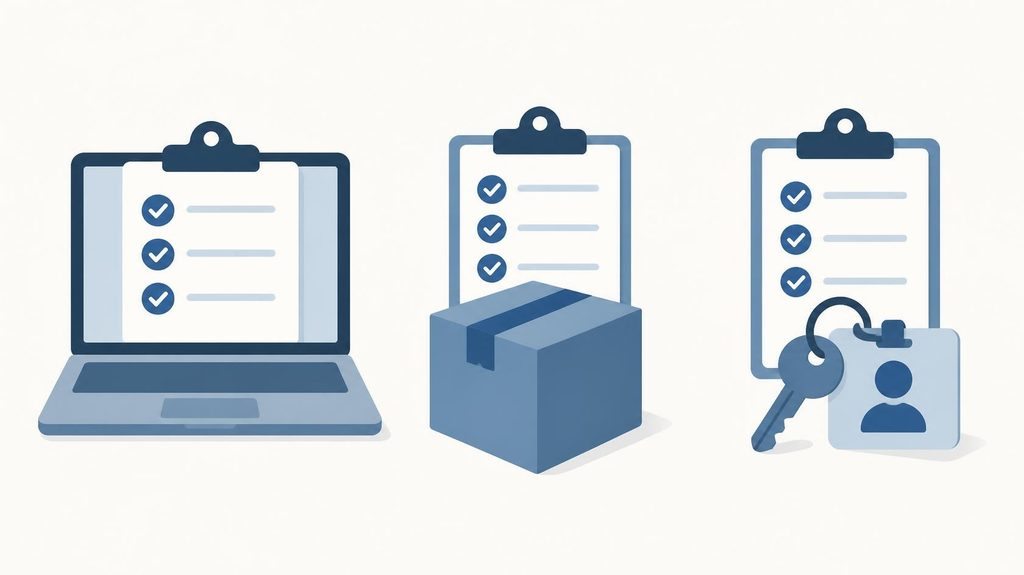
Remote onboarding fails or succeeds mostly on things that happen before the new hire ever logs in. In an office, a missing badge or a forgotten desk gets fixed in five minutes by whoever’s nearby. Remotely, the same gap can mean a new hire’s entire first morning goes to waste waiting on IT. Once an offer is signed, work through this list with a hard deadline of “done by the day before start date”:
- Ship equipment early. Laptop, monitor, and any hardware should ship with enough buffer to arrive 3-5 business days before start date, with tracking info shared so the new hire isn’t anxiously refreshing a delivery app on top of everything else.
- Pre-create every account. Email, calendar, Slack, project management tool, file storage, and password manager should all exist and be tested before day one — not requested on day one. A new hire staring at “access pending” for their first two hours notices the disorganization immediately.
- Add them to Slack early. Create the account, add them to their team channel, any relevant project channels, a social channel (#watercooler, #introductions), and open a DM thread with their manager — all before their first login, so day one starts with context already waiting instead of an empty workspace.
- Send a day-one agenda in advance. A calendar invite for every meeting, a rough hour-by-hour plan, and a note on what to expect removes the single biggest source of first-day anxiety: not knowing what’s supposed to happen.
- Assign a buddy — not the manager. Pick a peer, confirm with them ahead of time, and have them send a short “excited to have you starting” message before day one. The buddy relationship is one of the better-evidenced remote onboarding practices: Microsoft’s New Employee Experience research found new hires who met with an assigned buddy at least once in their first 90 days reported becoming productive faster and were 36% more satisfied with onboarding overall.
Step 2: Day One — Structure Over Improvisation
The instinct on day one is to front-load it with meetings so the new hire “meets everyone.” Resist it. A remote day one that’s wall-to-wall video calls is exhausting and teaches nothing — alternate live and async blocks, and never run more than two consecutive hours of video. A workable structure:
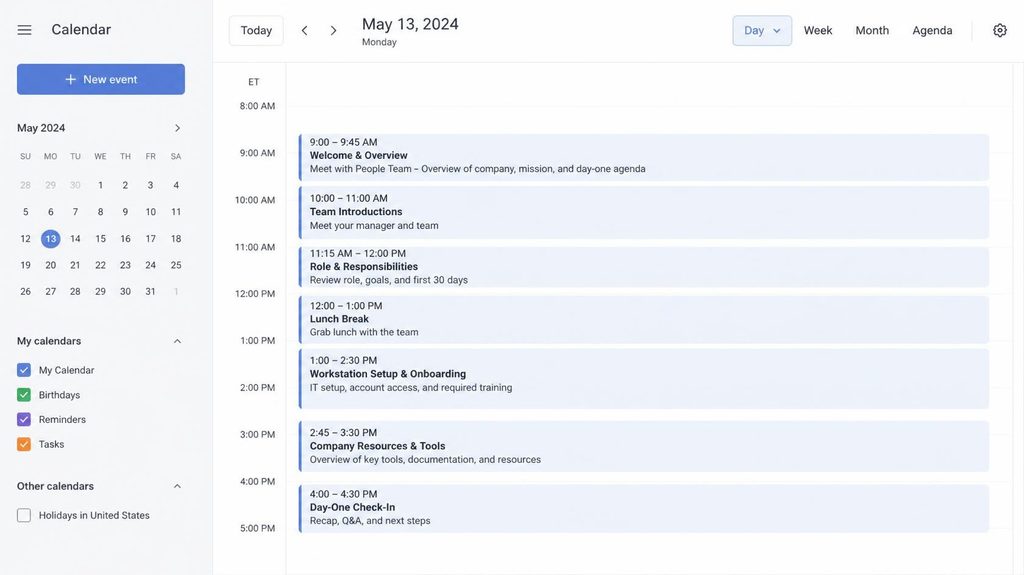
- Morning: welcome call with the manager (30 min, live). Not an HR presentation — a human conversation. What the role actually involves day to day, how the team works, and a chance to ask questions without an audience.
- Mid-morning: IT and tools walkthrough (30-45 min, live, with support on standby). Walk through the core tools — chat, project management, file storage, calendar — live, and keep someone available afterward for the setup problems that inevitably come up once the new hire is on their own.
- Late morning: self-paced async time. Company overview doc, values, handbook — material the new hire can absorb at their own pace instead of sitting through a live readout of a document.
- Afternoon: buddy introduction (30 min, live) + team intro post in Slack. A casual, low-stakes conversation with the buddy, and a short “please welcome” post in the team channel so the wider team knows who just joined.
- End of day: async check-in. A short written or Loom check-in from the manager — how did today feel, what’s unclear, what’s on the calendar tomorrow — closes the day without adding another live call.
Step 3: Days 2-3 — From Orientation to Context
The middle of the first week is where most remote onboarding quietly falls apart — day one has structure, but days two and three often get left to “figure it out,” which is exactly how new hires end up idle or stuck. Keep the structure going:
- Role-specific tool training. Not another general company tour — the specific systems this person will use daily, walked through by whoever actually uses them, live or via a recorded Loom walkthrough they can replay.
- 1:1s with key collaborators. 15-20 minute intro calls with the 3-5 people the new hire will work with most closely, spaced across both days rather than stacked into one afternoon.
- A real starter task — small, but real. Not a “practice” assignment. A genuinely useful, appropriately scoped piece of work that produces a visible result by the end of the week. Early wins build confidence and give the manager a concrete first data point on how the new hire works.
- Documentation access, centralized. Point to one place — a wiki, Notion, or shared drive — rather than scattering onboarding material across email threads and Slack DMs the new hire will never find again. If your documentation setup isn’t there yet, our Documentation-First Ops playbook covers how to build it.
Step 4: Days 4-5 — First Deliverable and the 30-60-90 Plan

By the end of the first week, a new remote hire should have shipped something and know exactly what’s expected of them for the next three months — both are what turn “orientation” into actual onboarding:
- Wrap the starter task. Have the new hire present or share what they built, however small, in a written update or a short call. This is the first real feedback loop, and it matters more for confidence than the task’s actual size.
- Walk through the 30-60-90 day plan together. This should already exist as a draft before day one — day five is when you review it together, adjust based on what you’ve learned in the first week, and make sure the new hire leaves with clear, written expectations rather than a vague “we’ll figure it out as we go.”
- Schedule recurring 1:1s now, not later. Book weekly manager check-ins for at least the first month directly onto the calendar before the week ends. Manager contact frequency is one of the stronger predictors of ramp-up speed — Microsoft’s research found remote hires who met weekly with their manager in the first 90 days reached full productivity noticeably faster than those who met less often.
- End-of-week retro. A short, honest conversation: what felt confusing, what tool didn’t work as expected, what they wish someone had told them on day one. Feed it straight back into your onboarding template so the next hire’s first week is a little better than this one.
Step 5: Turn It Into a Reusable Template
The entire point of building this once is to never rebuild it from memory. Put the pre-boarding checklist, day-by-day schedule, and 30-60-90 plan into a single Google Doc or Notion page, then duplicate it for every new hire — filling in names, dates, and role-specific tools instead of starting from a blank page. Structured, repeatable onboarding is the difference that shows up in the data: remote hires who go through a structured 90-day program reach full productivity in roughly 60-75 days on average, compared to 90-120 days for unstructured remote onboarding, and structured programs have been linked to meaningfully lower turnover in a new hire’s first 90 days. The template is the whole mechanism — it’s what turns “we’re good at onboarding when we remember to be” into something that happens the same way every time, whether the person doing the hiring remembers every step or not.
Free Tools That Cover This Entire Flow
| Need | Free option | When to upgrade |
|---|---|---|
| Onboarding template & docs | Google Docs or Notion free plan | Notion Team plan ($10/seat/mo annual) once you want a shared onboarding database across multiple hires and roles |
| Team chat & async intros | Slack Free (90-day message history) | Slack Pro ($8.75/seat/mo annual) once you need full searchable history for onboarding docs and threads |
| Recorded tool walkthroughs | Loom Free (up to 25 videos, 5 min each) | Loom Business ($15/seat/mo annual) once your walkthroughs run long or you need an unlimited video library |
| Task tracking for onboarding steps | A free tier of your existing project management tool (checklist per hire) | Only if you’re not already running one — most teams already have this covered |
| E-signature for paperwork | Free tier of tools like DocuSign or HelloSign (limited envelopes/month) | A paid plan once hiring volume exceeds the free envelope cap |
A solo founder or small team can run this entire five-day flow on tools they’re almost certainly already paying for. The upgrades above are about volume and history retention, not capability — none of them are required to onboard your first remote hire well.
Common Mistakes to Avoid
- Waiting until day one to set up accounts and access. A new hire’s first morning spent waiting on IT sets the tone for the rest of the week, and it’s entirely avoidable with a pre-boarding checklist.
- Stacking day one full of back-to-back video calls. It’s exhausting, teaches little, and gives the new hire no time to actually absorb anything. Alternate live and async blocks.
- Making the manager the onboarding buddy. New hires are far less likely to ask a “dumb question” to the person who’ll review their performance. A peer buddy fills a different, necessary role.
- No real task until week two or three. Delaying a first deliverable delays the first real feedback loop and the new hire’s first sense of actually contributing.
- Treating the 30-60-90 plan as optional. Without one, expectations get improvised, and improvised expectations are the fastest way to a new hire who’s guessing at what “doing well” even means.
- Rebuilding the onboarding plan from scratch for every hire. If it’s not a duplicable template, quality will vary by whoever happens to be doing the hiring that month.
FAQ
Can you really fully onboard someone remotely in a week?
Not fully — full ramp-up to independent productivity typically takes 60-90 days even with a structured program. What you can do in a week is give a new hire everything they need to stop feeling lost: working tools, a clear plan, a completed first task, and real relationships with a manager and buddy. That’s the foundation the rest of the 30-60-90 day plan builds on.
Do we need dedicated onboarding software for this?
No. Everything in this guide runs on a shared doc, a chat tool, and a video tool most small teams already have. Dedicated onboarding or HR platforms start to earn their cost once you’re hiring frequently enough that manually duplicating a doc template becomes a bottleneck — not before.
What if the new hire is in a very different time zone from the rest of the team?
Lean harder on the async blocks in this plan — recorded Loom walkthroughs instead of live tool training, written end-of-day check-ins instead of calls — and schedule the live pieces (manager welcome call, buddy intro) at whatever single overlap window both parties have, even if it’s short. The structure matters more than perfect synchronicity.
How long should the onboarding buddy relationship last?
At least the first 90 days, even if daily contact tapers off after week one or two. The research on buddy programs measures impact over a 90-day window, not just the first week, so keep the relationship active — a standing biweekly check-in works well — well past the new hire’s first Friday.
The Bottom Line
A good remote first week isn’t about cramming in more — it’s about removing the guesswork an office absorbs automatically: knowing what’s happening, who to ask, and what’s expected. Pre-board seriously, structure day one around energy rather than headcount of meetings, give days two through five real substance and a real task, and end the week with a written 30-60-90 plan and a standing 1:1 on the calendar. Build it once as a duplicable template, and every hire after the first one gets a better week than the one before it.